eyeOT ops

See how your entire environment works together.

eyeOT finds every device on your network, maps how cameras, servers, switches and VMS connect, flags what needs attention and lets your team fix it remotely. One platform for every site.

Data center with network racks, servers, security cameras, VMS displays and access control
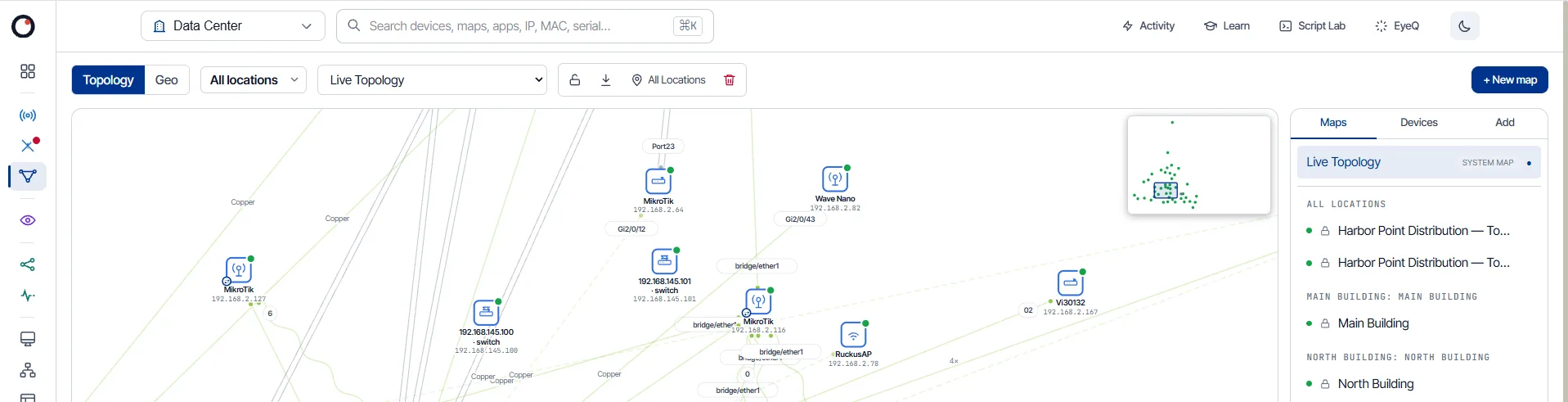
eyeOT topology map of a warehouse network: core and floor switches linked to wireless radios, access points and cameras, with link speeds, a minimap and saved maps by building
Cloud or on-premDeployment flexibility
SOC 2 Type IIIndependently audited controls
2026 SIA New Products and Solutions Awards winner 2026 SIA NPS Award WinnerRecognized at ISC West
Enterprise readyMulti-tenant & multi-site

Your problems aren’t just hidden. They’re disconnected.

A camera goes dark because a switch port failed. A VMS slows down because storage is full. A door controller drops after a power blip. Each tool sees its own piece. eyeOT shows how the pieces connect, so your team finds the cause and fixes it.

How the platform works

One platform for the work your team already has to do.

eyeOT handles seven jobs your team already does every week, so they no longer depend on separate tools, manual checks and site visits.

01 / Understand

Know what’s actually on the network.

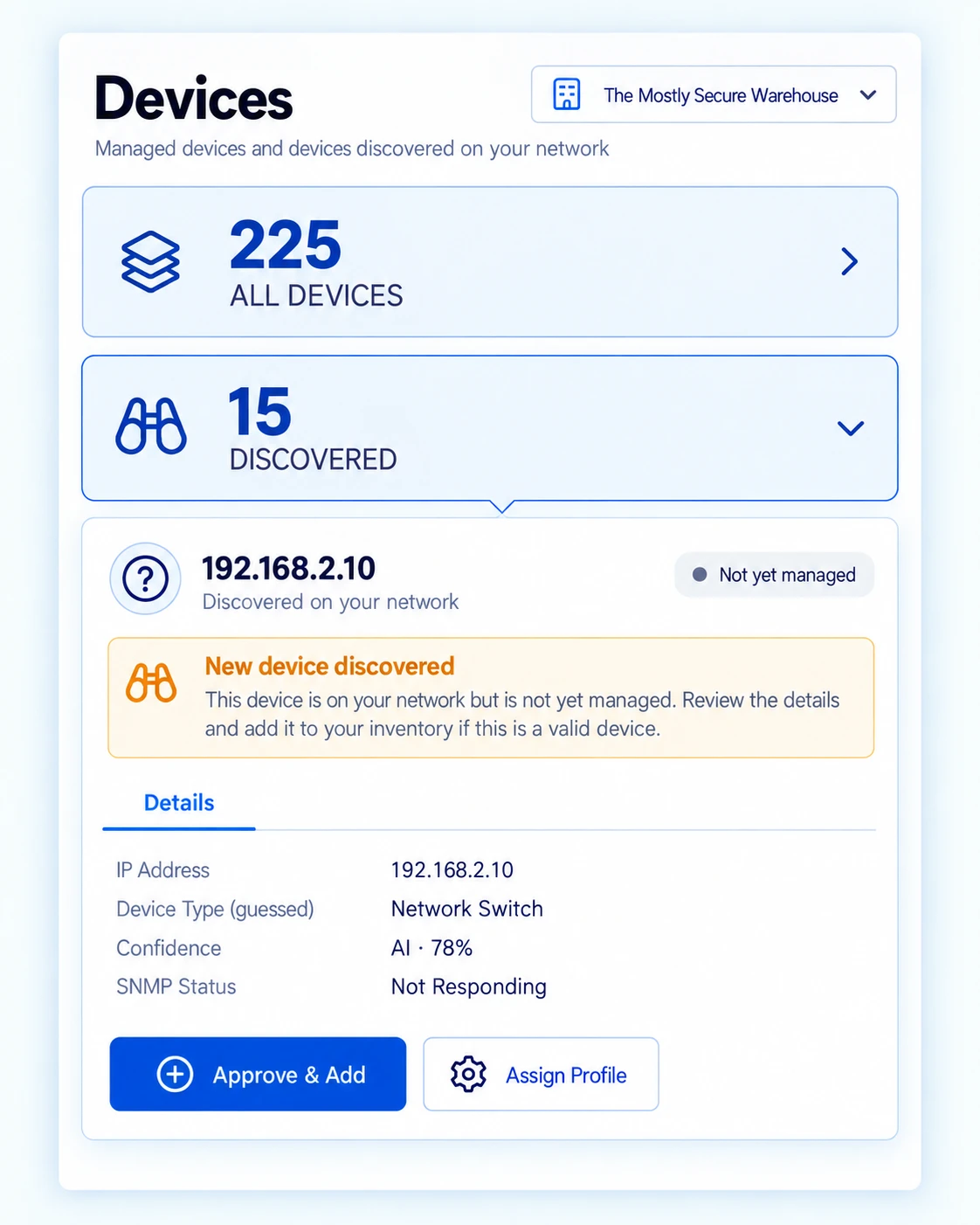
eyeOT scans your subnets, identifies cameras, switches, servers, door controllers and other IP devices, and sorts them by site and customer. New or unknown devices land in a review queue.

VALUEA device list you can trust, without building a spreadsheet by hand.
See supported devices
eyeOT Devices view showing 225 managed devices and a newly discovered switch awaiting approval

02 / Detect

Uncover potential issues before you get a call.

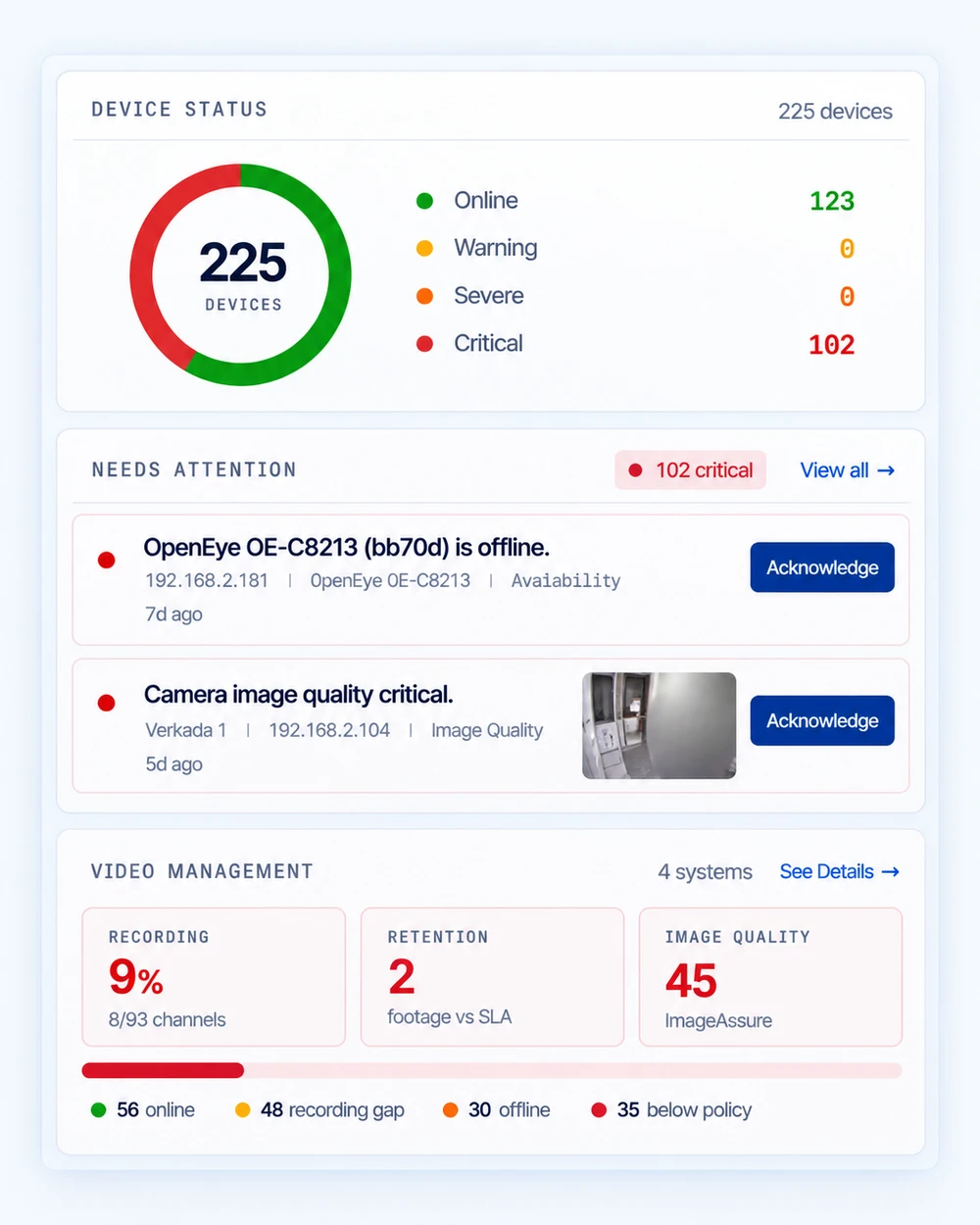
eyeOT watches availability and health on every device at every site, and sends alerts by email, Slack, Teams, PagerDuty or ConnectWise. ImageAssure catches cameras that are online but showing a blurred, blocked or black image.

VALUEYour team works the exceptions instead of checking every site.
How ImageAssure works
eyeOT device status, critical incidents needing attention and video management health

03 / Diagnose

Go from the alert to the cause faster.

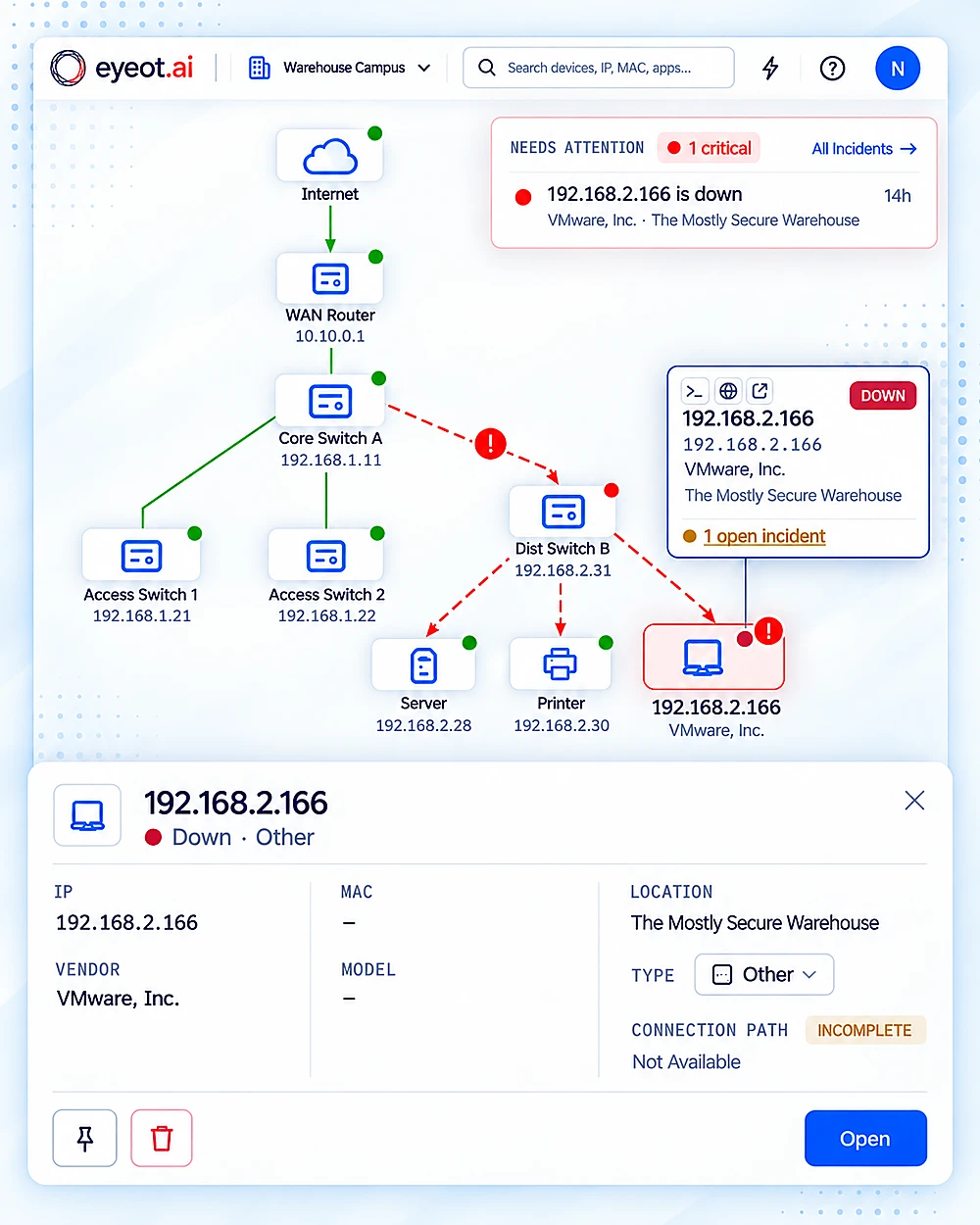
Every alert shows what the device connects to: the switch and port, the recorder or server, the site. When a switch fails, you get one incident that lists the cameras and controllers behind it, not a separate alert for each one.

VALUELess time jumping between consoles to rebuild the picture.
eyeOT topology tracing a down device back through Dist Switch B, with its device details open

04 / Act

Fix it remotely when you can.

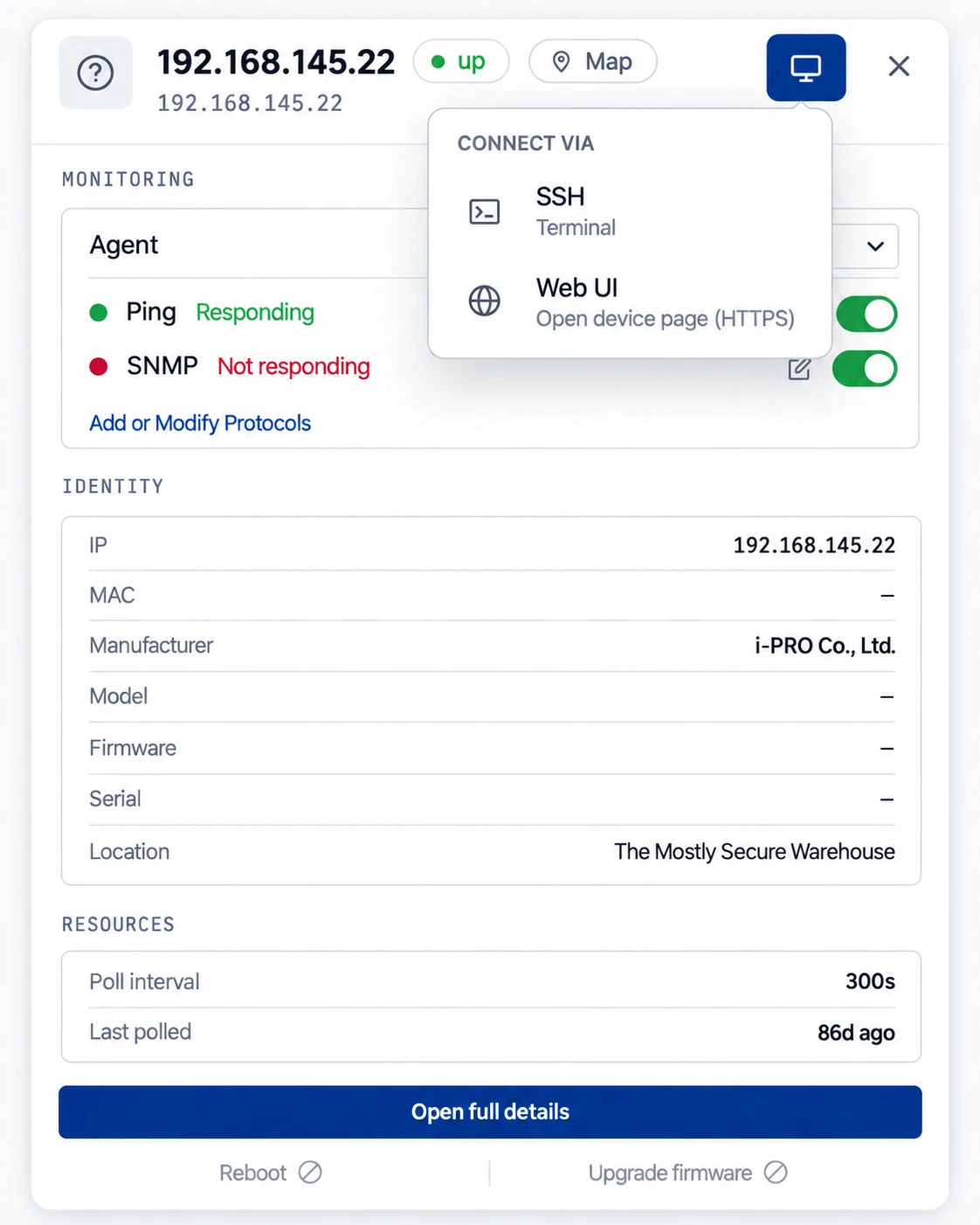
From the incident, bounce a switch port, reboot a supported camera, restart a service or open RDP or SSH. Saved scripts handle the steps you repeat.

VALUEFewer truck rolls.
eyeOT device panel with monitoring protocols, identity, poll interval and SSH or Web UI connect options

05 / Verify

Confirm it’s back, and keep the record.

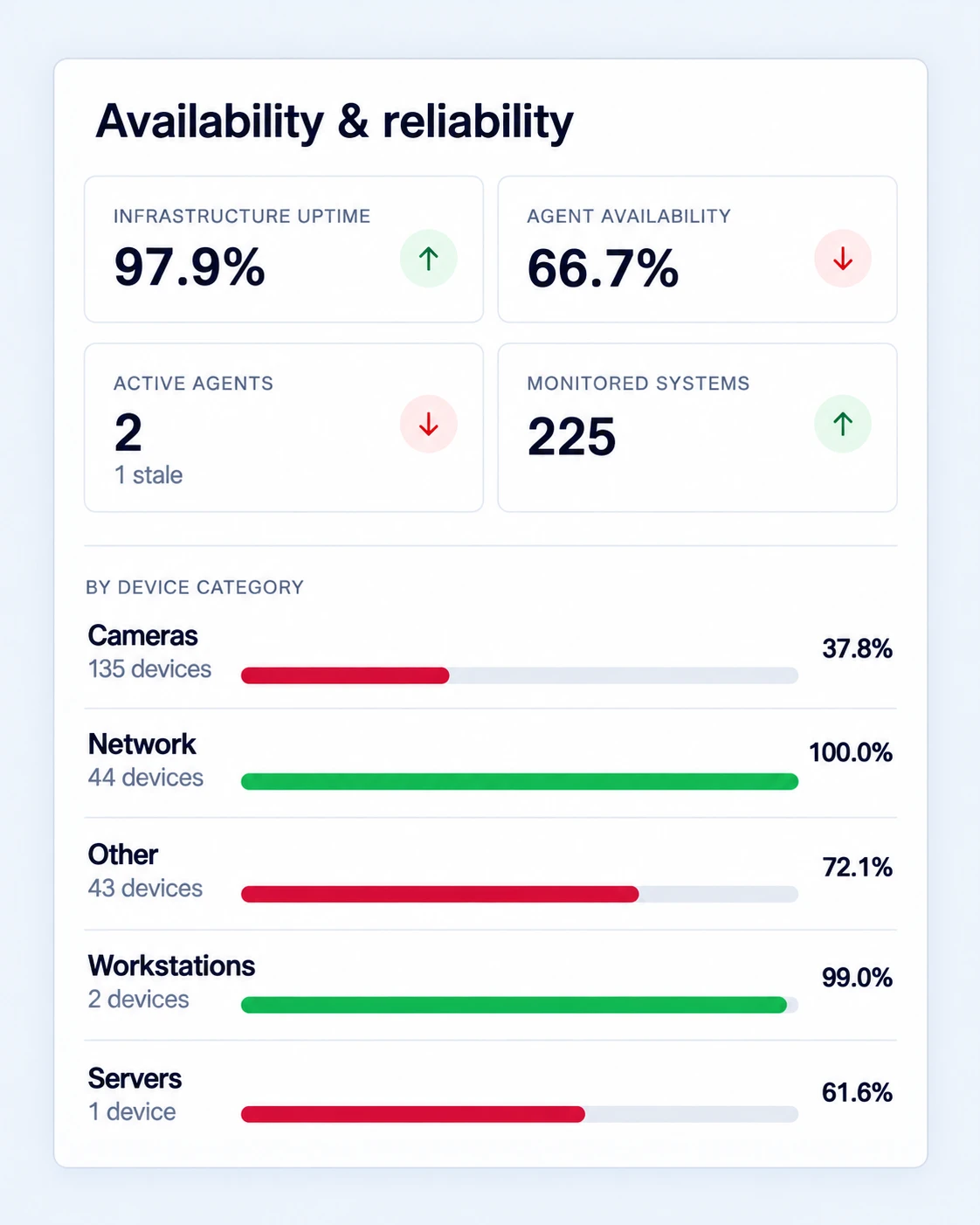
After a fix, eyeOT shows whether the device and everything behind it recovered. Availability reports show when something went down, when it came back and how often it happens.

VALUEProof for your customer, your manager or your auditor.
See infrastructure monitoring
eyeOT availability and reliability report with infrastructure uptime, agent availability and uptime by device category

06 / Automate

Take routine device work off your team’s plate.

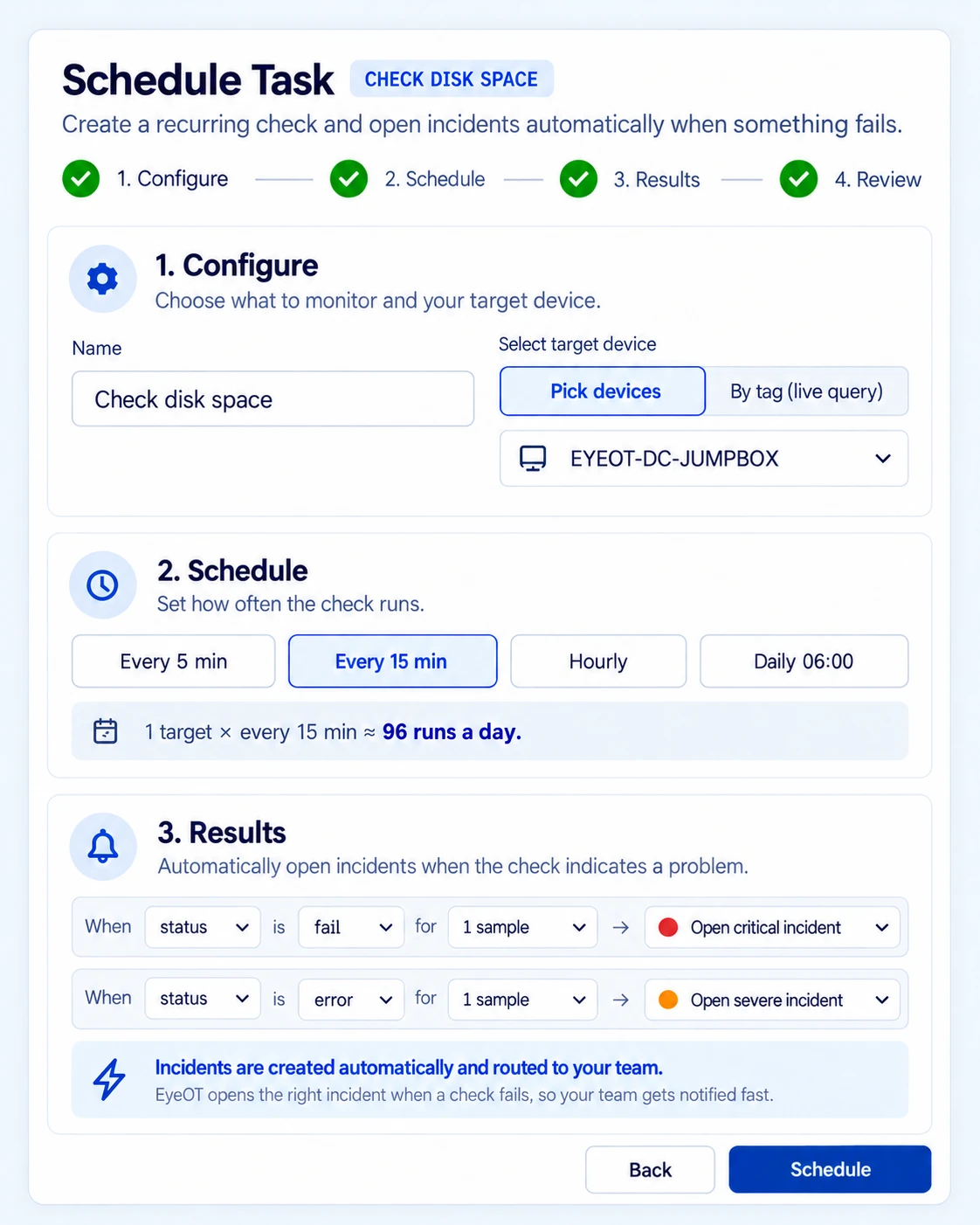
Schedule reboots, rotate device passwords, and track and renew certificates across sites, for supported devices. Add DeviceAssure to track firmware, end-of-support dates and known vulnerabilities.

VALUEUpkeep happens on schedule, not when someone finds the time.
eyeOT Schedule Task setup: a disk space check every 15 minutes that opens incidents automatically when it fails

07 / Connect

Keep site records in sync as the environment changes.

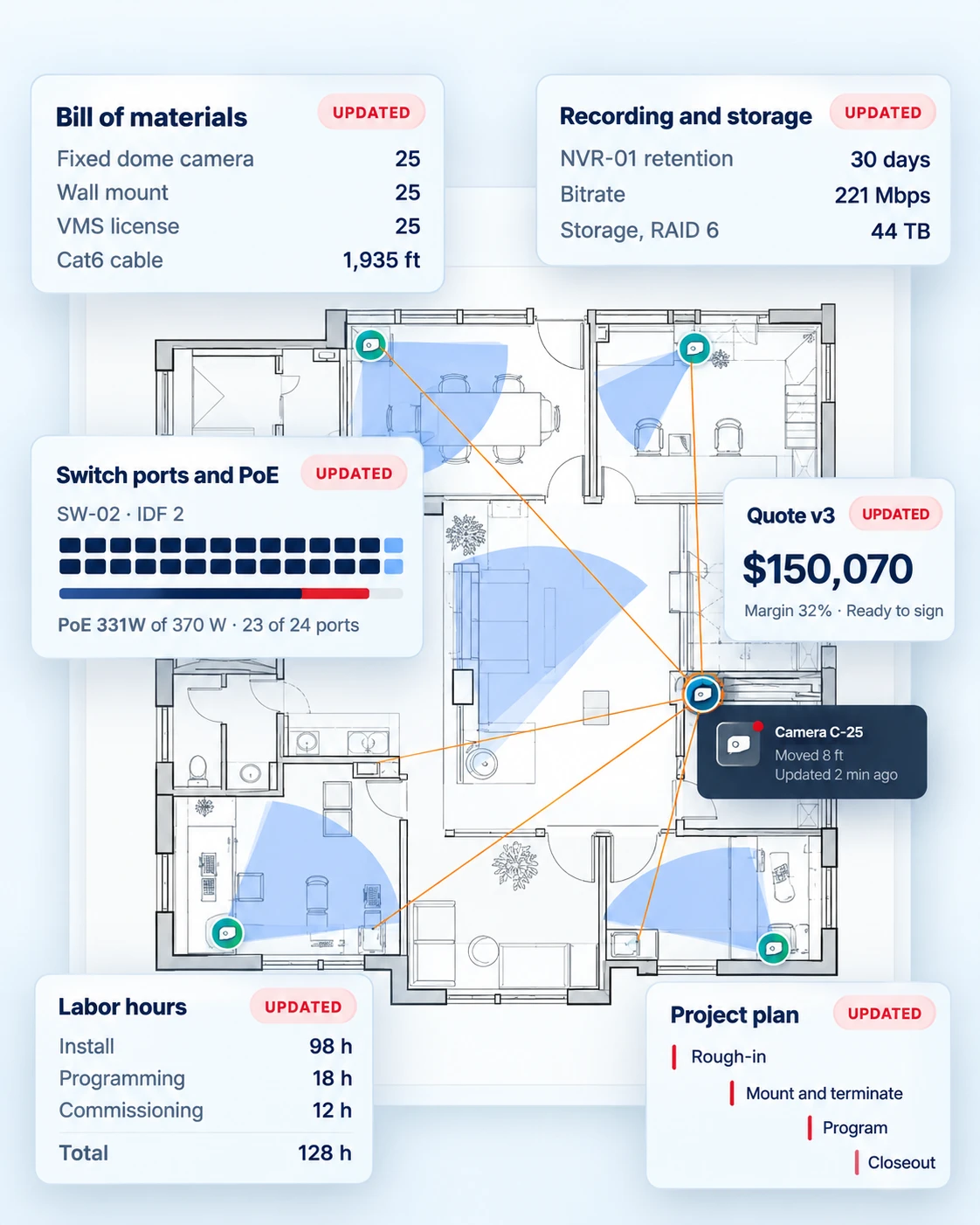
eyeOT planner keeps every site’s floor plans, device locations, cabling and bill of materials current as devices are added, moved or replaced. Inherit a site or start a new one and see what’s installed, what changed and what to reuse.

VALUERecords that match what’s installed at every site, so the next site starts from what works.
See eyeOT planner
eyeOT planner floor plan where moving one camera updates the bill of materials, storage, switch ports, quote, labor and project plan

See this workflow run on your own environment.

We’ll run discovery, monitoring, diagnosis and a remote fix on the sites and systems your team actually supports.

Get a Custom Demo

Customer story

One network map the county and its integrators share.

Nik Urban runs the network for Queen Anne’s County, Maryland. The integrators who support the county’s security systems now work from the same live map his team does.

“
Our integration partners now have their own accounts and can see the network map in real time.
Nik UrbanNik UrbanIT Network Manager, Queen Anne's County, MD

Works with the environment you already have

Connect the tools and systems already in the stack.

Deep integrations with leading VMS, camera, network and server platforms. Anything else on IP gets availability, network location and remote power-cycle. Alerts and tickets go to ConnectWise, Slack, Teams, PagerDuty, email or webhook.

Explore integrations →

Security & architecture

Built for the environments you are trusted to manage.

Independently audited and deployable in the cloud or on-premises. The eyeOT agent connects outbound only, and on supported hardware it often comes preinstalled. Customers stay in separate tenants, and you control what each user can do remotely.

SOC 2 Type II, tested and attested by Prescient Assurance
SOC 2 Type IIIndependent controls assurance for the eyeOT platform.
Explore security & architecture →
Single outbound accessDevices connect through the eyeOT agent, not each on its own.
Backup agentMonitoring continues if the primary agent or connection drops.
Cloud or on-premisesRun eyeOT in the cloud or inside your own network.
Multi-site, multi-tenantEvery customer and site stays separate.
Single sign-onSign in to eyeOT through your identity provider.
Per-user remote-access limitsChoose which remote-access tools (RDP, SSH, web) each user can open.

FAQ

Questions teams ask before a demo.

What is the eyeOT platform?

eyeOT is an infrastructure management platform for networks, servers and physical security systems. It discovers devices, maps how they connect, monitors health and availability, and gives technicians remote tools to fix problems. ImageAssure, DeviceAssure and eyeOT planner are add-ons that work inside the same platform.

Is eyeOT a network monitor or an RMM?

Both, and more. eyeOT is an NMS, RMM and IoT monitoring platform in one. It monitors and manages network gear, servers, cameras, VMS and other connected devices in a single view, and maps how they depend on each other.

What does eyeOT integrate with?

One platform for the whole estate: network, servers, cameras and the tools your team already uses.

eyeOT connects to the systems you already run. There is no rip-and-replace. Most integrations work out of the box, and the on-prem agent reaches devices on your LAN without opening any inbound firewall ports.

Deep integrations: full inventory, health, configuration and remote actions, built and maintained by us.

  • Video management: Milestone XProtect, Genetec Security Center, Avigilon Unity, Hanwha Wave, Nx Witness and OpenEye
  • Cameras: Axis, Hanwha Vision, Avigilon and ONVIF devices, including firmware upgrades, reboots and snapshot checks
  • Network: Cisco, Ubiquiti UniFi, MikroTik, Juniper, Fortinet, Meraki, RUCKUS One, Aruba and Siklu
  • Servers and virtualization: Dell iDRAC, HPE iLO and VMware vSphere
  • Service management: ConnectWise for ticketing

Broad device coverage: hundreds of vendors with thousands of device integrations cover switches, routers, wireless and point-to-point radios, cameras, encoders, NAS, UPS and power systems, firewalls and access control. They include Adtran, Alcatel-Lucent, Bosch, Cambium, Dahua, Hikvision, i-PRO, Netgear, QNAP, Sony, SonicWall, Synology, Vertiv, Life Safety Power and many more. New devices are added through profiles, not custom engineering.

Works with your workflow: route incidents to ConnectWise and PagerDuty, and sign in with your identity provider (OIDC).

Don’t see your device? Ask us. Most additions take days, not quarters.

What can technicians do remotely?

Restart services, rotate device passwords, reboot devices and bounce switch ports. Technicians can also open remote sessions over HTTP/HTTPS, RDP and SSH. Admins can limit which remote-access protocols each user can run.

How is eyeOT priced?

Pricing depends on how many devices and sites you monitor and which add-ons you use. eyeOT planner has its own published pricing. Share a rough device count and we’ll send a quote.

Can eyeOT run on-premises?

Yes. eyeOT runs in the cloud or on-premises. In the cloud, a lightweight agent at each site connects outbound only, so you don’t open inbound firewall ports.

Will eyeOT flood us with alerts?

No. When one device takes others down with it, eyeOT groups them into one incident that shows the likely source. Maintenance mode silences alerts during planned work.

Does eyeOT replace our VMS or ticketing system?

No. eyeOT works alongside them. It monitors your VMS and the infrastructure under it, and syncs incidents two ways with ConnectWise PSA.

Get a Custom Demo

See eyeOT running on your own devices and sites.

Tell us what you manage. We’ll walk you through discovery, the topology map, monitoring and remote fixes on a setup like yours.

Get a Custom Demo