
01 / Capture
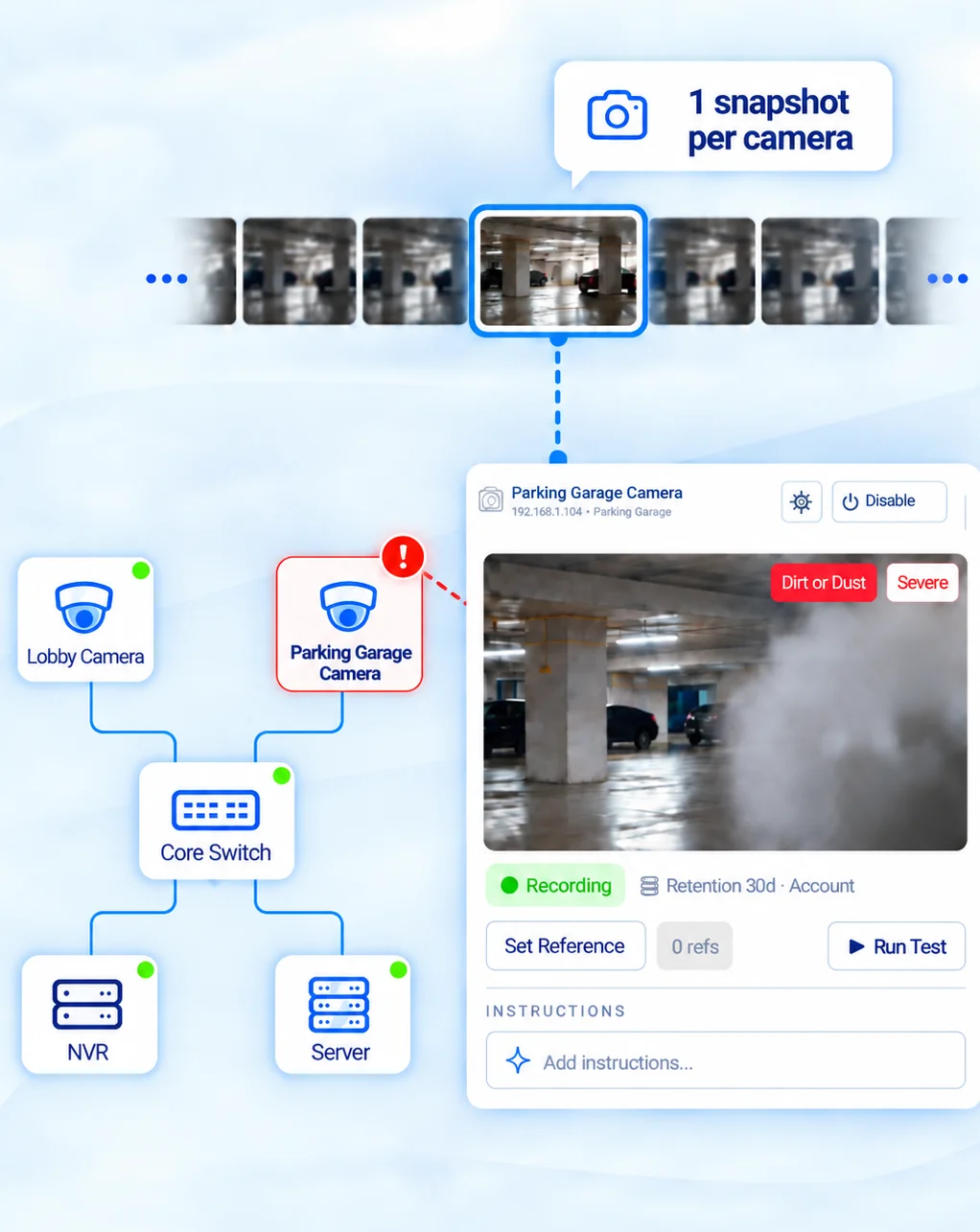
Takes a snapshot, not a stream.
ImageAssure pulls one image per camera through your VMS instead of tapping a live stream. Nothing is installed on the cameras.
ImageAssure
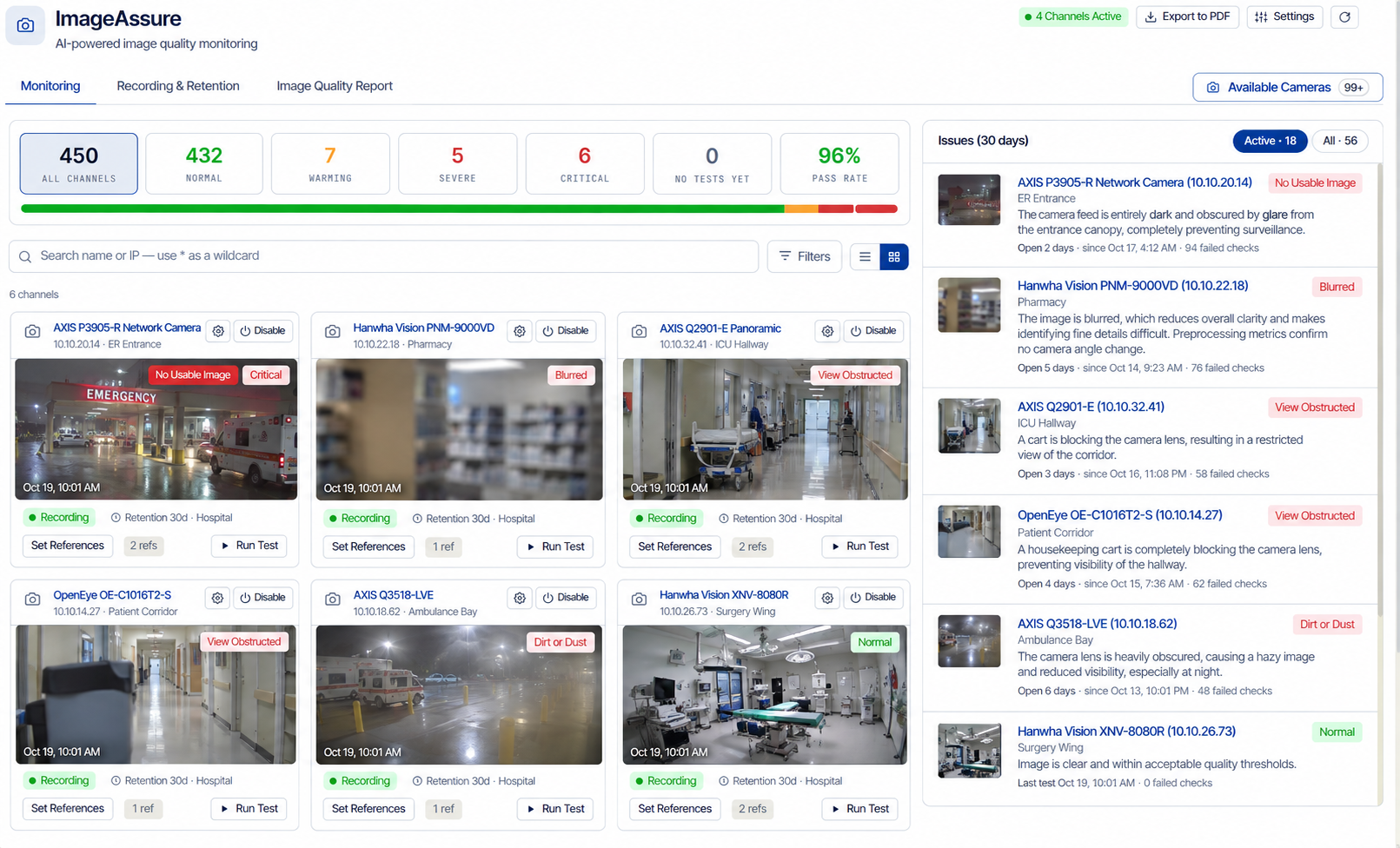
A camera can be online and recording while its image is blurred, blocked or unusable. ImageAssure automatically checks for six common problems so your team can find and fix them before the footage is needed.
ImageAssure detectsA camera can stay online while its image is black, grey or unusable.
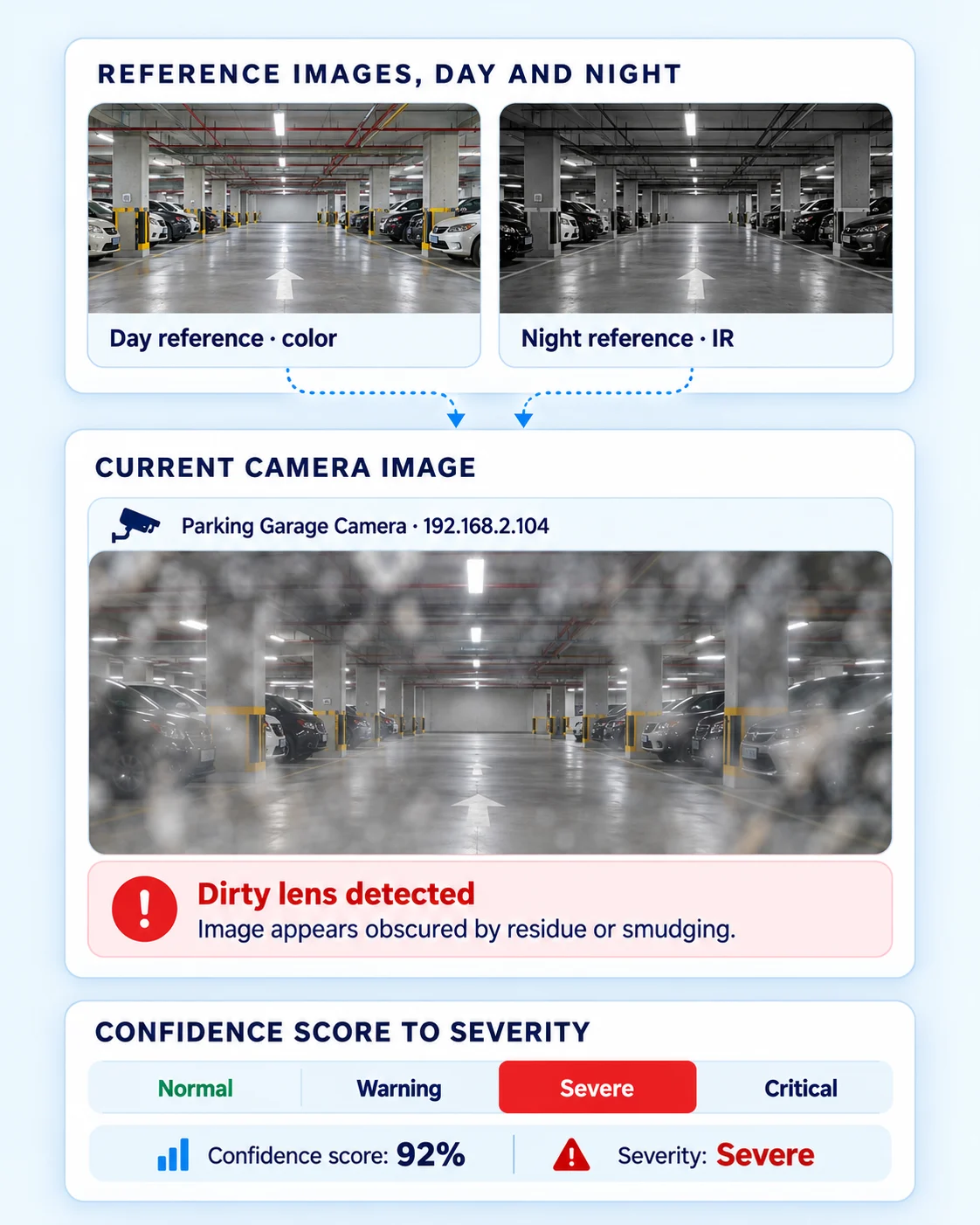
ImageAssure detectsFlags smudges, dust and haze that degrade image quality.
ImageAssure detectsThe camera’s view no longer matches its saved reference image.
ImageAssure detectsDetects soft or out-of-focus footage that loses important detail.
ImageAssure detectsThe video can look clear while its timestamp is out of sync.
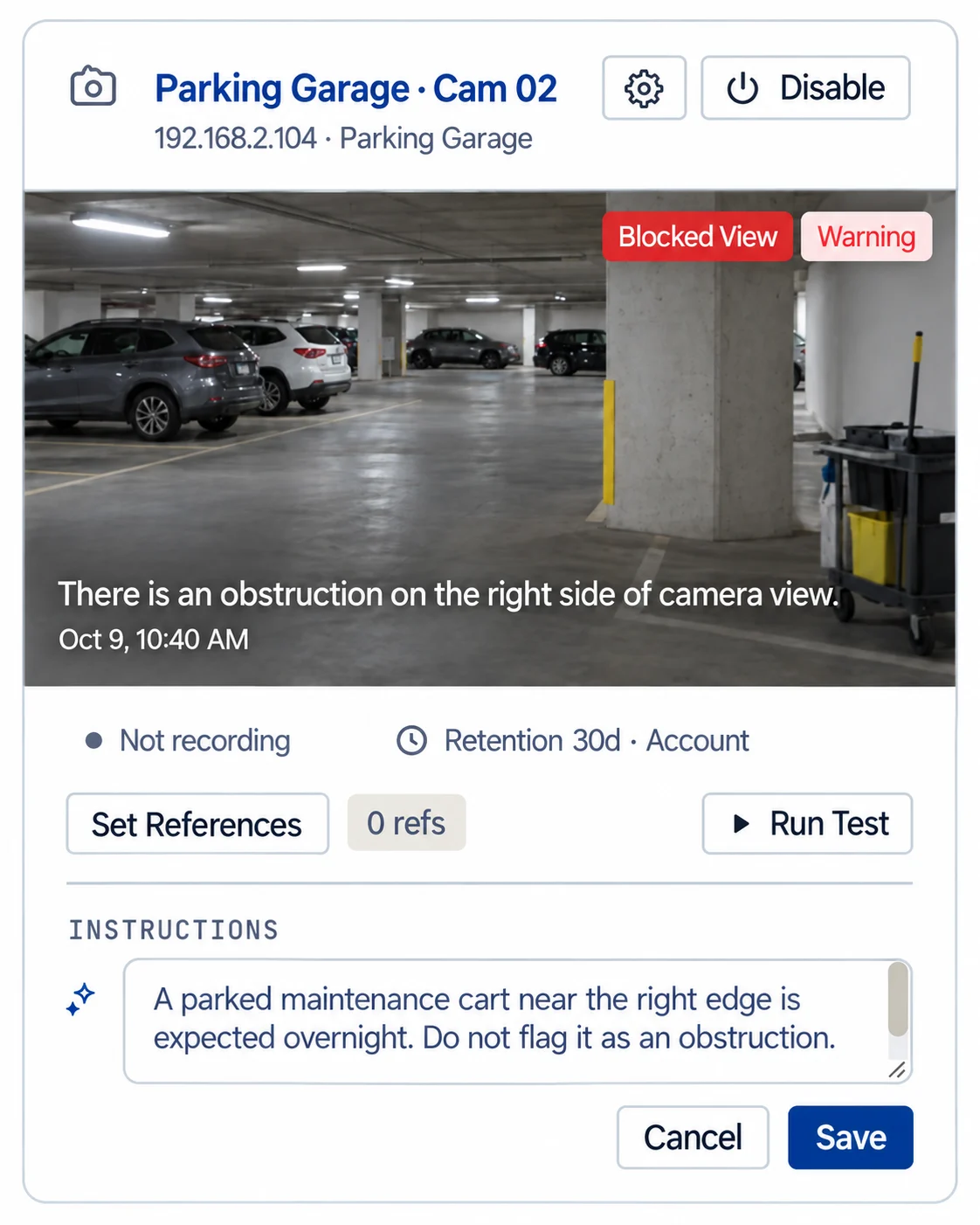
ImageAssure detectsIdentifies equipment or other objects obstructing the scene.


Award-winning technology
ImageAssure was recognized in the Managed Services category of the SIA New Products and Solutions Awards at ISC West 2026.
How it works
Here’s how each camera’s image becomes an alert your team can act on, and a dated record that every camera was checked.
01 / Capture
ImageAssure pulls one image per camera through your VMS instead of tapping a live stream. Nothing is installed on the cameras.
02 / Review
Each check returns a confidence score and a plain-English reason, so your team sees what’s wrong and how sure ImageAssure is. Day and night reference images give the movement check a known-good view.
03 / Set Rules
A plant in front of the lens, a train that parks every night, water spots after rain. Describe it in plain English and ImageAssure stops flagging it, around the clock or only during the hours you set.
04 / Alert
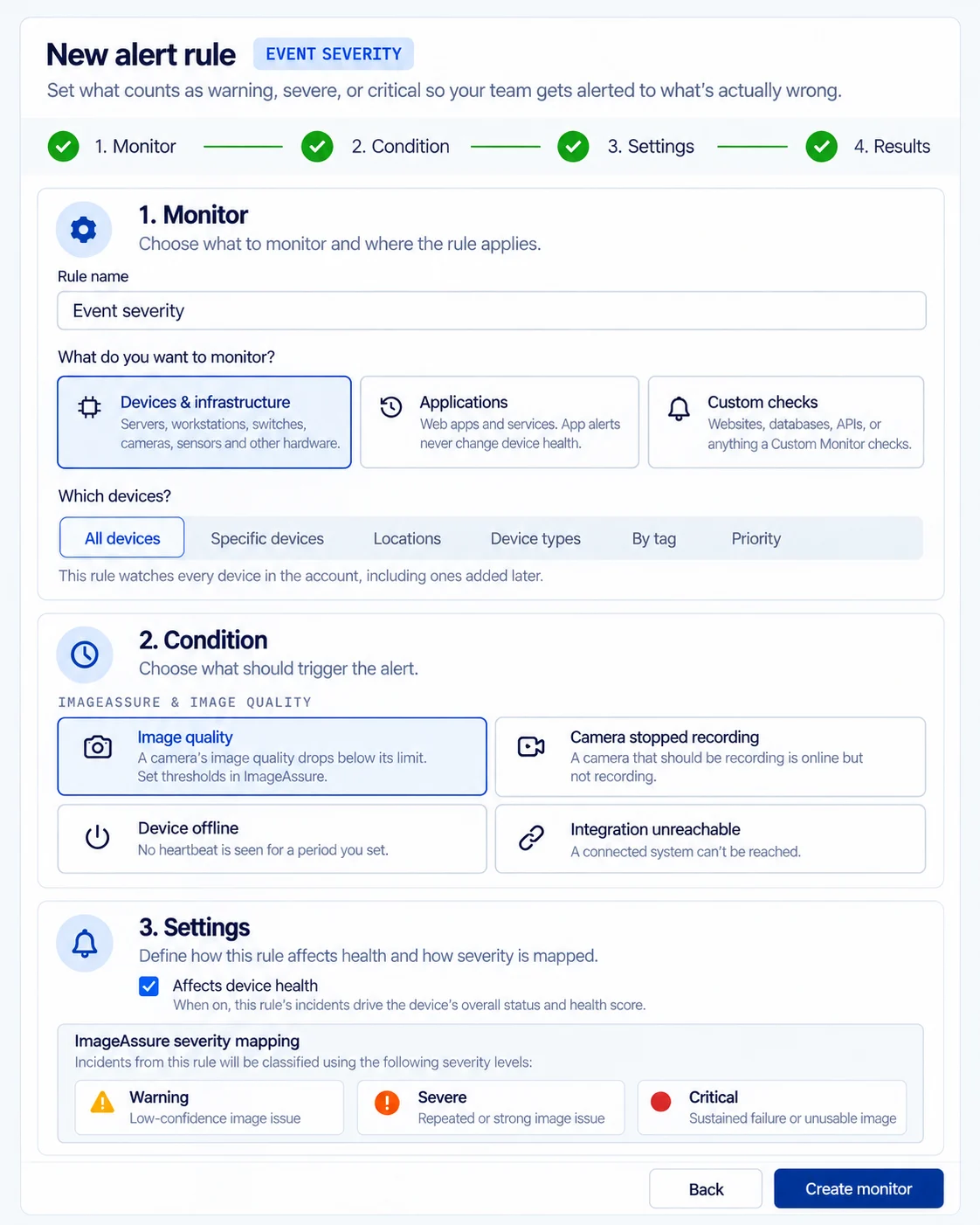
You set what counts as warning, severe or critical. Each alert shows the image and what’s wrong, so your team can triage it without opening the VMS. A repeat failure updates the same incident.
05 / Prove
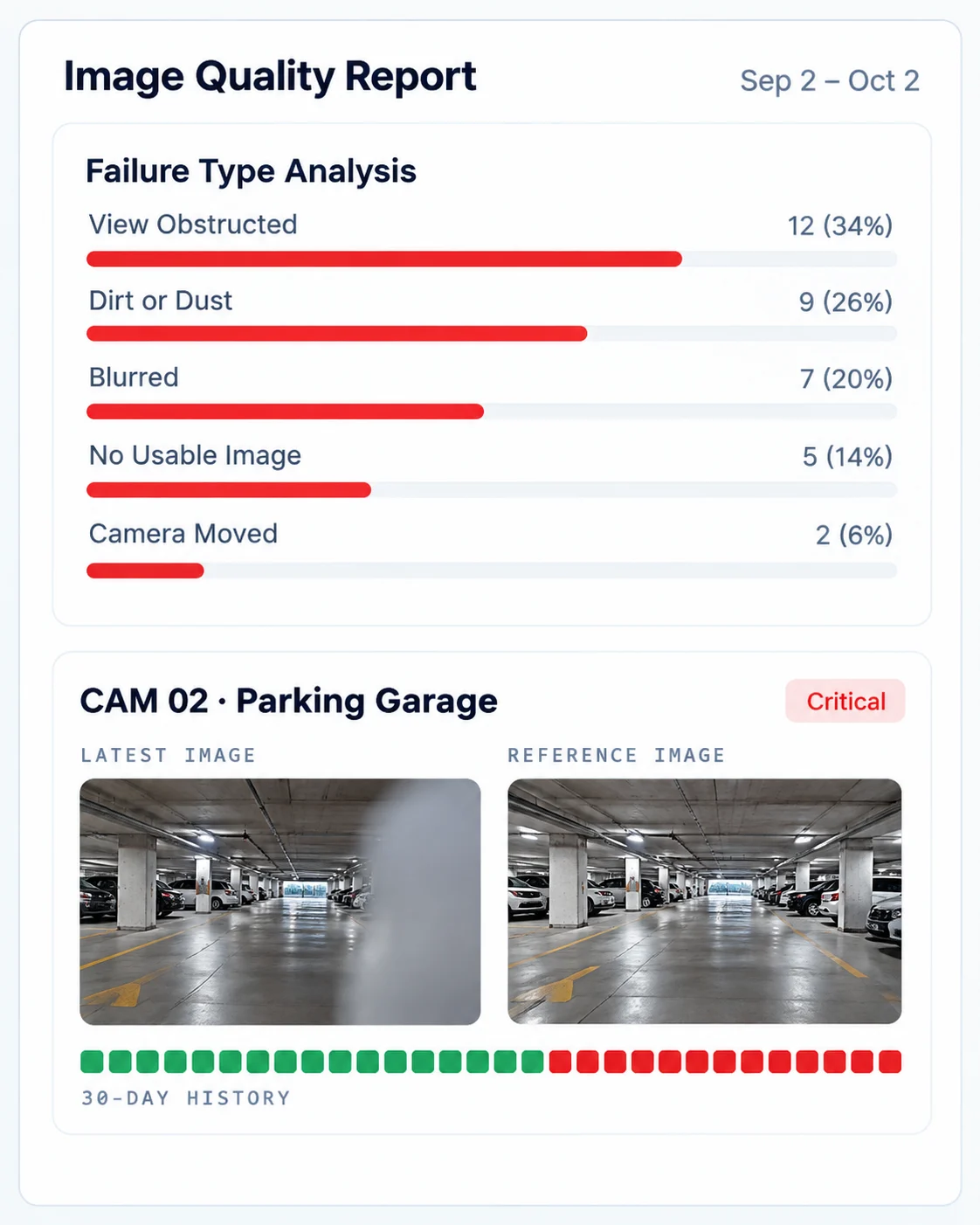
The Image Quality Report shows each failure by type and severity, next to the camera’s reference image, for the last 30 days. Schedule it or run it on demand, and export it to PDF.
Customer proof
Convergint runs ImageAssure on the Port of Los Angeles camera system, where weather and salt air can blind a camera with no alarm from the VMS.
ImageAssure sets eyeOT apart from everyone else. None of our other systems have those capabilities. It flagged one of our cameras when night fog rolled in and you couldn’t see anymore. Now it’s on 700+ of them.
We’ll show you the checks, special instructions, alerts and reports on a setup that matches your VMS and camera count.
Network and data
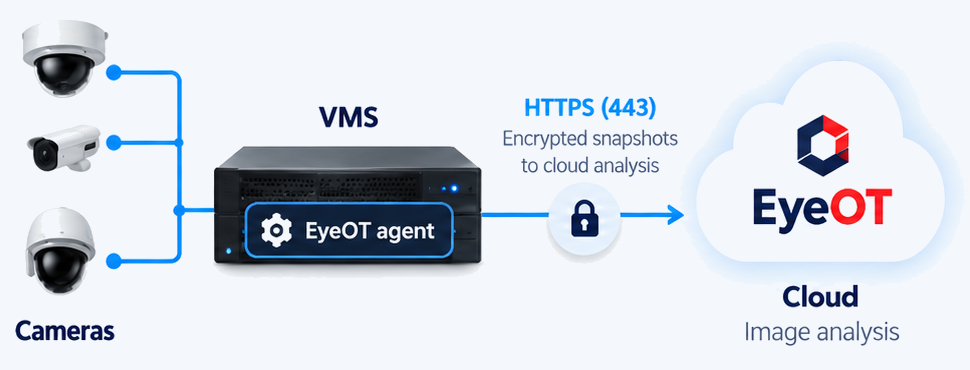
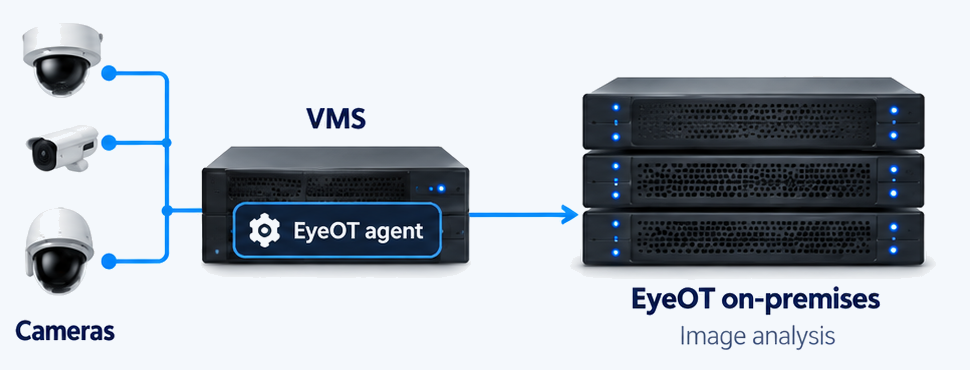
Run ImageAssure in the cloud or entirely on premises, depending on your network, security and data requirements. Your recordings stay in your VMS.
Snapshots travel encrypted over the eyeOT agent’s outbound-only HTTPS (443) connection to eyeOT’s US-hosted cloud. No inbound firewall rules, port forwarding or VPN.
For sites where images can’t leave the network. The AI model runs on hardware at your site, alongside an on-premises eyeOT deployment, completely isolated from any cloud.
The camera stayed online and kept recording, so no status check flagged it. Here’s how ImageAssure caught it and the on-call technician resolved it remotely.
Illustrative example. Remote actions are taken by an authorized technician.
See how this would play out on your cameras.
Get a Custom DemoCompare
Every tool here checks camera images. The differences are which VMS it works with, where the analysis runs, how you tune it, and whether it can see and fix what’s behind the camera.
| The work | VMS-specific add-ons | Built into a VMS | Camera-health services | |
|---|---|---|---|---|
| Check the imageBlack, blur, moved, dirt and obstruction | Covered | Partial | Covered | Checked on every scan, with the snapshot and the reason |
| Catch timestamp driftCamera clock out of step | Not listed | Not listed | Covered | One of the six checks on every camera |
| Work with any VMSPlus cameras added directly | Not listed | Not listed | Partial | Any VMS, plus ONVIF and RTSP |
| Tune each camera in plain EnglishTell it what to expect in each scene | Not listed | Partial | Not listed | Special instructions per camera, which can apply to set hours |
| Run image analysis on-premisesFor sites where images can’t leave the network | Not listed | Covered | Not listed | Cloud or on-premises, with the model on hardware at your site |
| Check recording and retentionIs the camera recording, and for how long | Covered | Partial | Covered | Checked alongside image quality |
| See the switch port behind the cameraTopology and PoE port bounce | Not listed | Partial | Partial | Topology in the same view, and a PoE port bounce from the device page |
| Monitor recorder and server hardwareiDRAC and iLO | Partial | Partial | Partial | Recorder and server health in the same view |
| Open ticketsConnectWise PSA and ServiceNow | Not listed | Not listed | Covered | Findings open tickets in ConnectWise PSA and ServiceNow |
| Send team alertsSlack, Teams and PagerDuty | Partial | Not listed | Not listed | Alerts to Slack, Teams and PagerDuty |
Based on published product information for leading tools in each category, October 2026. “Not listed” means we found no published information on it. Features change, so check current details with each vendor.
Who it’s for
Clean and re-aim the cameras that need it, not every camera on a schedule. Add image health to your service agreements and show customers the proof.
For integrators →Know which cameras on your network are recording usable video, alongside the switches and servers behind them.
For IT & OT teams →Integrations
No rip-and-replace. Keep the cameras and VMS you have today, and get findings in the ticketing and alerting tools your team works in.
Explore integrations


FAQ
ImageAssure is eyeOT’s camera image monitoring. It takes a snapshot from each camera through any VMS, instead of streaming video, and checks it for six failures that ping, SNMP and VMS status checks miss: no usable image, blur, a moved camera, dirt or dust, obstruction and timestamp drift. It runs in eyeOT’s cloud or on-premises. ImageAssure won the 2026 SIA New Products and Solutions Award in the Managed Services category, under eyeOT’s former name, eyeOTmonitor.
Six: no usable image (black or grey frames on a live stream), blurred image, camera moved (compared with its reference image), dirt or dust on the lens or dome, view obstructed, and timestamp drift. Glare, water spots and similar conditions appear in the finding’s description, and a special instruction decides whether they matter for that camera.
Automatically, on a recurring schedule that includes night scans, so IR images are checked as well as daylight ones. The schedule can be adjusted. After a fix, you can retake a camera’s snapshot on demand to confirm it.
No. It uses a vision model with no scene training, so results start with the first scan. The movement check compares each snapshot with a reference image of the camera’s known-good view, which you can set or replace at any time. Special instructions are optional and add context for a specific camera.
Four ways: special instructions in plain English (“the plant is expected”, “a train parks on the siding most nights”), reference images that include the night view, per-camera check settings such as turning off the movement check on PTZs, and severity thresholds you set on each check’s confidence score. A camera that fails again updates its open incident instead of opening a new one.
We don’t publish a single accuracy rate, because results depend on your scenes, cameras and instructions. Every finding includes the snapshot and the reason, so your team can confirm it in seconds, and a pilot with your own cameras shows how it performs in your environment.
It works with any VMS, takes plain-English instructions for each camera, and can run its image analysis on-premises. It’s also part of eyeOT, so the switch port, recorder and server behind a failing camera are in the same view, and your team can bounce a PoE port or reboot a supported camera without a truck roll.
Any VMS, including:
It also supports ONVIF and RTSP, so it can pull a key frame straight from a camera. Each sensor on a multi-sensor camera is checked as its own channel.
In the cloud: the eyeOT agent on a Windows, Linux or macOS host, a Docker host or a Raspberry Pi, with outbound HTTPS (443) to eyeOT, plus a VMS integration or, for cameras added directly, their ONVIF or RTSP address and credentials. On-premises, the vision model runs on hardware at your site. Either way, add a reference image for each camera, ideally one by day and one at night, so the movement check has a known-good view.
No. ImageAssure takes a single still image per camera channel per scan instead of streaming video for analysis, so it adds very little load to your network and recorders. Continuous streaming from every camera would add network and recorder load across a large camera estate, which is why it’s built on snapshots.
Only snapshots, and only if you use the cloud. They travel over the eyeOT agent’s outbound-only HTTPS connection for analysis in eyeOT’s US-hosted cloud, with no inbound firewall rules. Video streams never leave the site, and on-premises nothing leaves your network.
Yes. ImageAssure runs on-premises alongside an on-premises eyeOT deployment, with the vision model on hardware inside your network, so camera images never leave the site. It’s built for casinos, utilities, government and other environments where data can’t leave the network.
They solve different problems. Tamper analytics are set up camera by camera, per manufacturer, and fire on sudden changes. ImageAssure catches the slow failures, like dirt, haze, drifting focus and a view that’s gradually blocked, applies the same six checks to every connected camera regardless of brand, and keeps a report of what it found. Camera-side tamper detection also tends to adapt to gradual change, so slow haze and focus drift become the new normal. The two can run side by side.
No. It reads snapshots from your VMS and works alongside it. There’s nothing to migrate: video, recording and retention stay in your VMS.
Per camera channel, as an add-on to the eyeOT platform or on its own, for cloud or on-premises deployments. Many teams start with a pilot on one site. Share your VMS, camera count and channel count and we’ll send a quote.
Get a Custom Demo
Get a personalized look at the image checks, alerts and reports that help your team find and resolve camera problems.
Get a Custom Demo