The server is up. The app isn’t.
A stopped service, a hung process or a full volume takes the application down while the host still answers ping. Users open a ticket before monitoring raises an alert.
Infrastructure Monitoring & Management
See every server, VM, application, switch and OT device, what each one depends on and what’s failing. Then fix it remotely: restart the service, reboot the server or power-cycle the PoE port.
 2026 SIA NPS Award WinnerRecognized at ISC West
Works with the infrastructure you already run
 HPE iLO
 Linux
Linux


Plus any SNMP v2c/v3 device.See all integrations →
The problem
Ping and up/down checks report the host as healthy while a service has stopped or a RAID array is running degraded. When something does fail, the evidence is split across separate tools, and the fix often means a truck roll.
A stopped service, a hung process or a full volume takes the application down while the host still answers ping. Users open a ticket before monitoring raises an alert.
The operating system keeps running on the remaining disks, so nothing looks wrong. The only warning sits in the iDRAC or iLO event log, and nobody is watching it.
The RMM, NMS, VMS, access control software and vendor portals each hold one piece. Every incident starts with swivel-chair triage across all of them.
A service restart, a reboot or a PoE port power-cycle takes two minutes remotely. It shouldn’t take a truck roll.
What we cover
Select a layer to see data sources, supported platforms and remote actions.
Hover or click any device on the map to see what eyeOT covers.
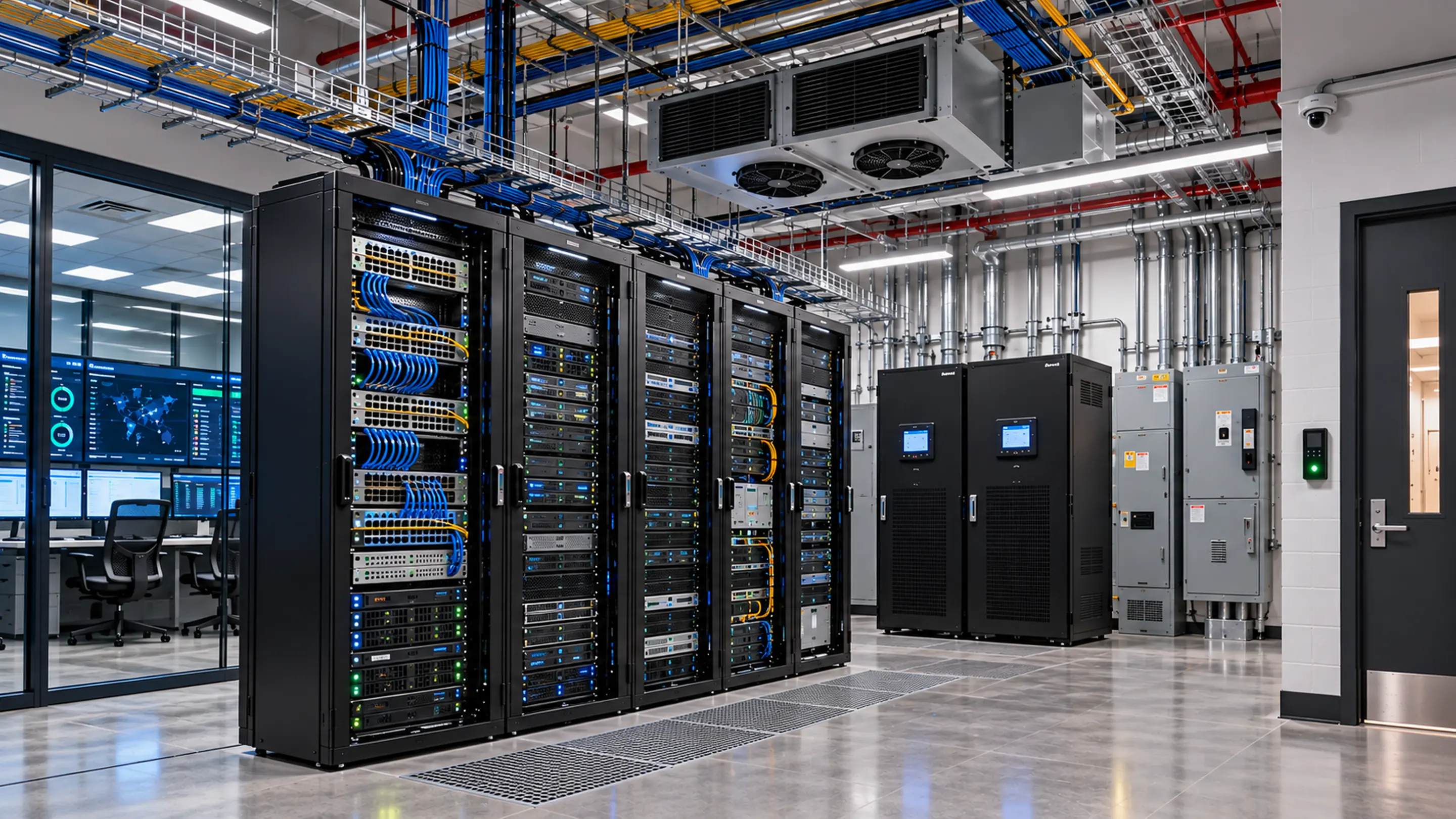
eyeOT monitors each server at three layers: the operating system through the agent, the hardware through out-of-band management (iDRAC, iLO, Redfish, BMC) and the virtual machines through vSphere.
Integrations include

 Linux
LinuxHost availability doesn’t prove the application is serving. Scheduled checks test the service, website, login, database or API directly.
Examples customers monitor
eyeOT discovers the network down to the switch port, so you know what’s downstream of any device before you change it.
Integrations include
Cisco Meraki RuckusMikroTikSiklu
Cameras, door controllers, PLCs, intercoms and power supplies get network-level monitoring by default: ICMP and SNMP availability, mapped to the switch port that serves each one. Supported platforms go deeper.
Integrations include

 Any IP device at network level
A lightweight agent at each site polls devices locally and reports out over HTTPS. No site-to-site VPN and no inbound firewall rules.
Deploy it as
How the work changes
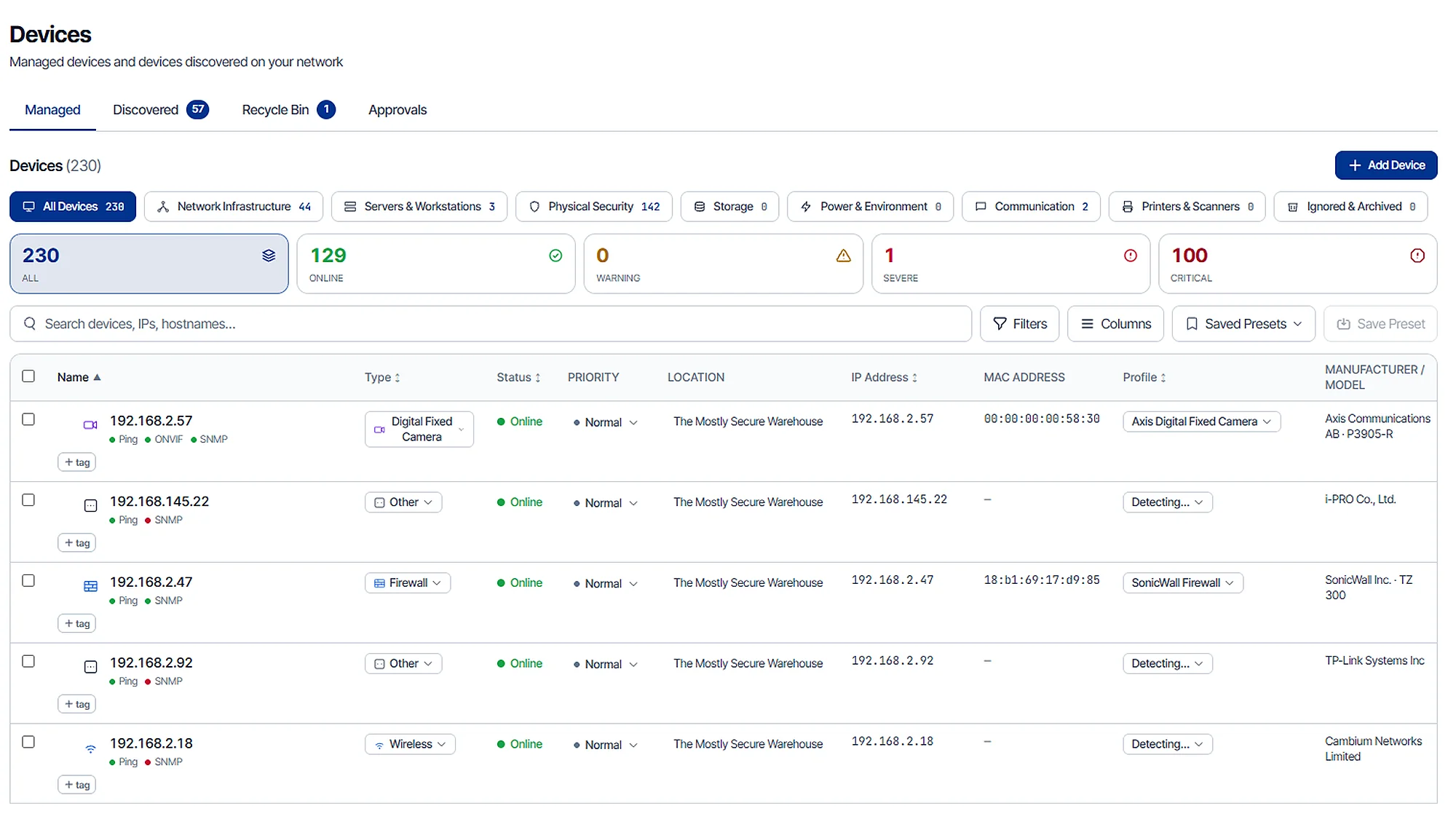
Subnet scans, SNMP, CDP/LLDP and cloud-controller imports build a live inventory of servers, VMs, switches, firewalls, radios, cameras, door controllers and other IP devices, organized by customer, site and building. It replaces the spreadsheet, and the as-built that went stale after handoff.
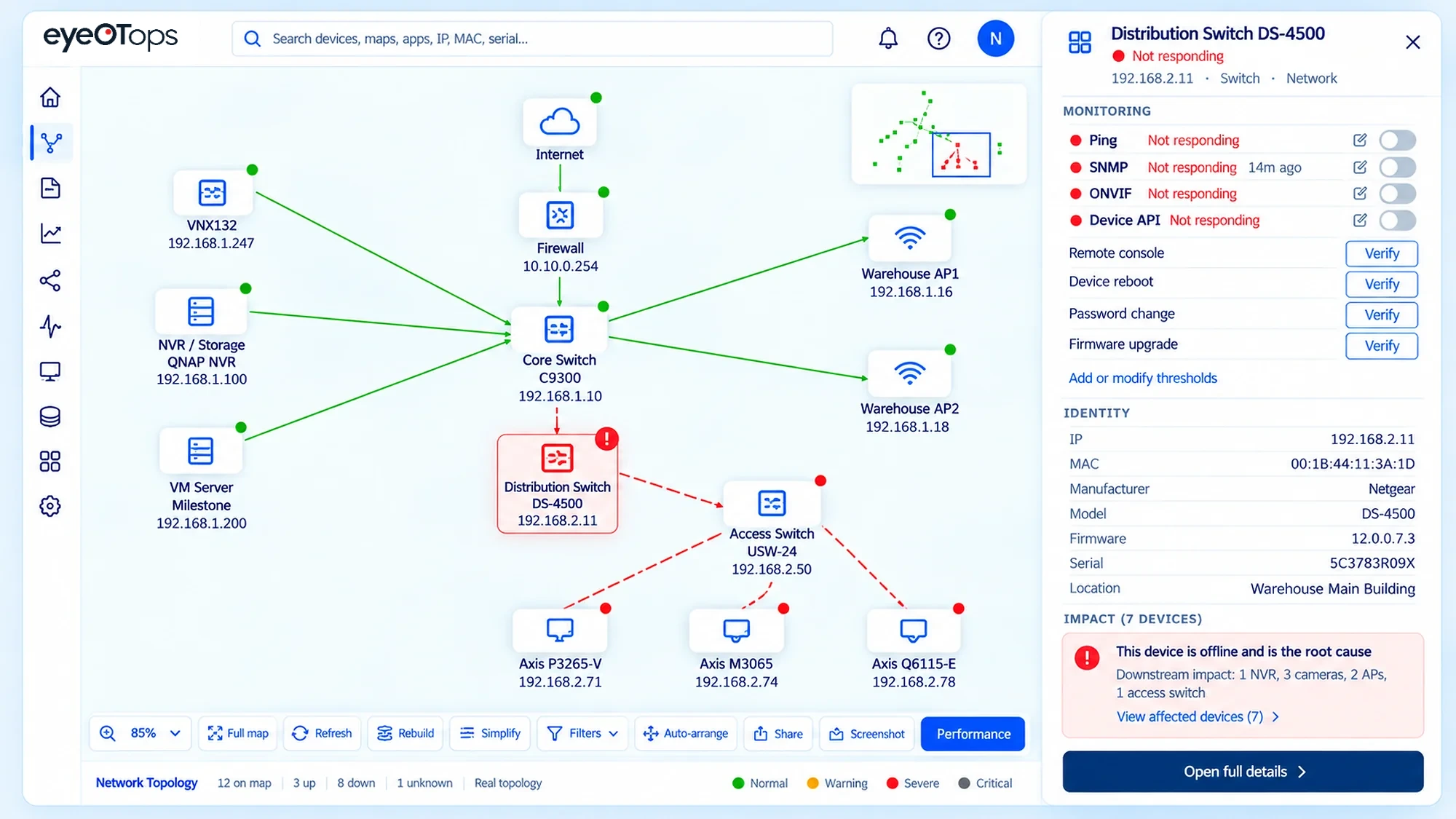
When a check fails, the incident shows the affected server or device, its current state, and the applications, storage and network path it depends on. Triage starts with context instead of rebuilding it across separate consoles.
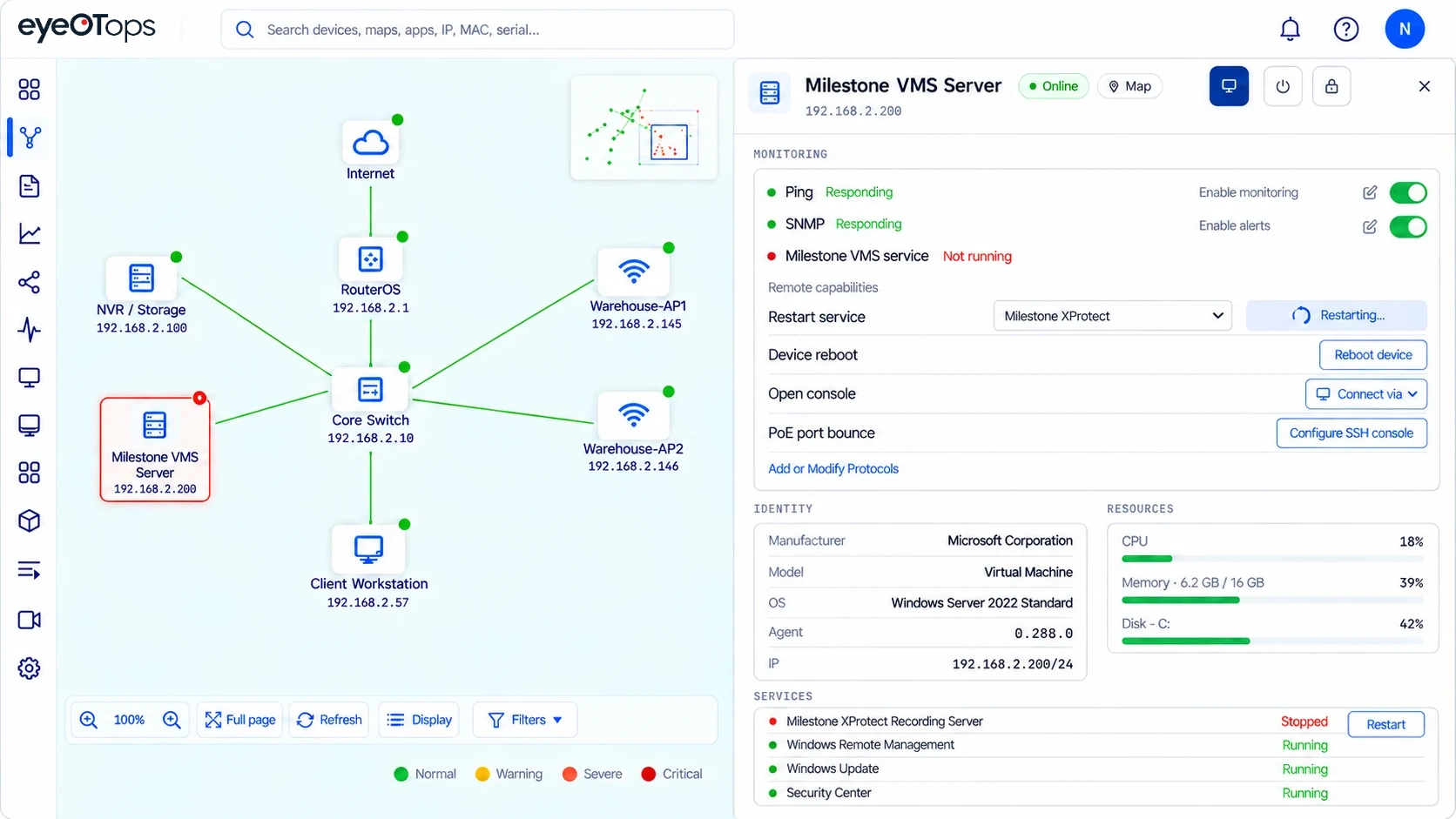
Restart the service, reboot the server or supported device, or power-cycle a device or PoE port, from the incident where you found the problem. No VPN, no RDP session, no site visit.
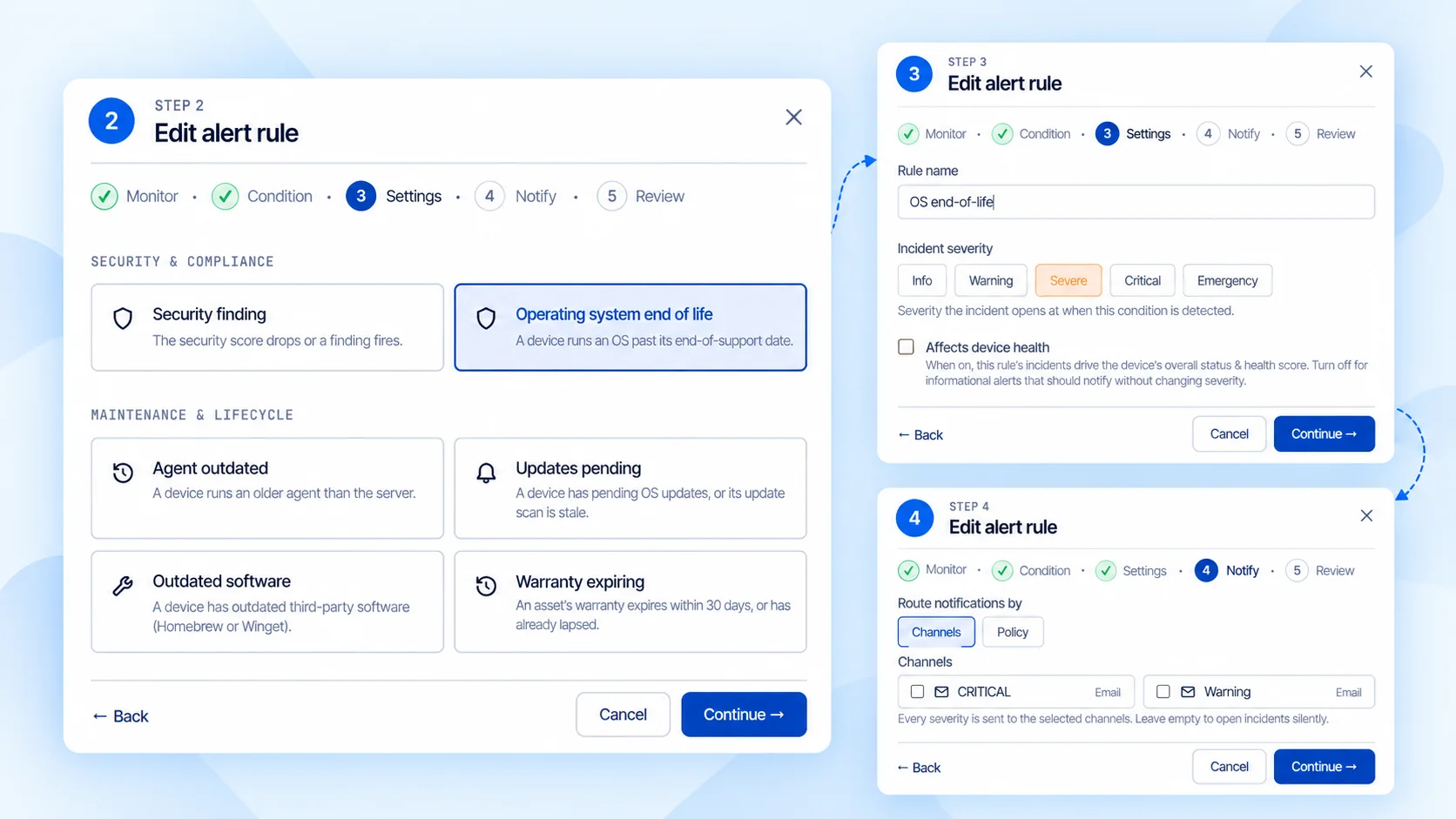
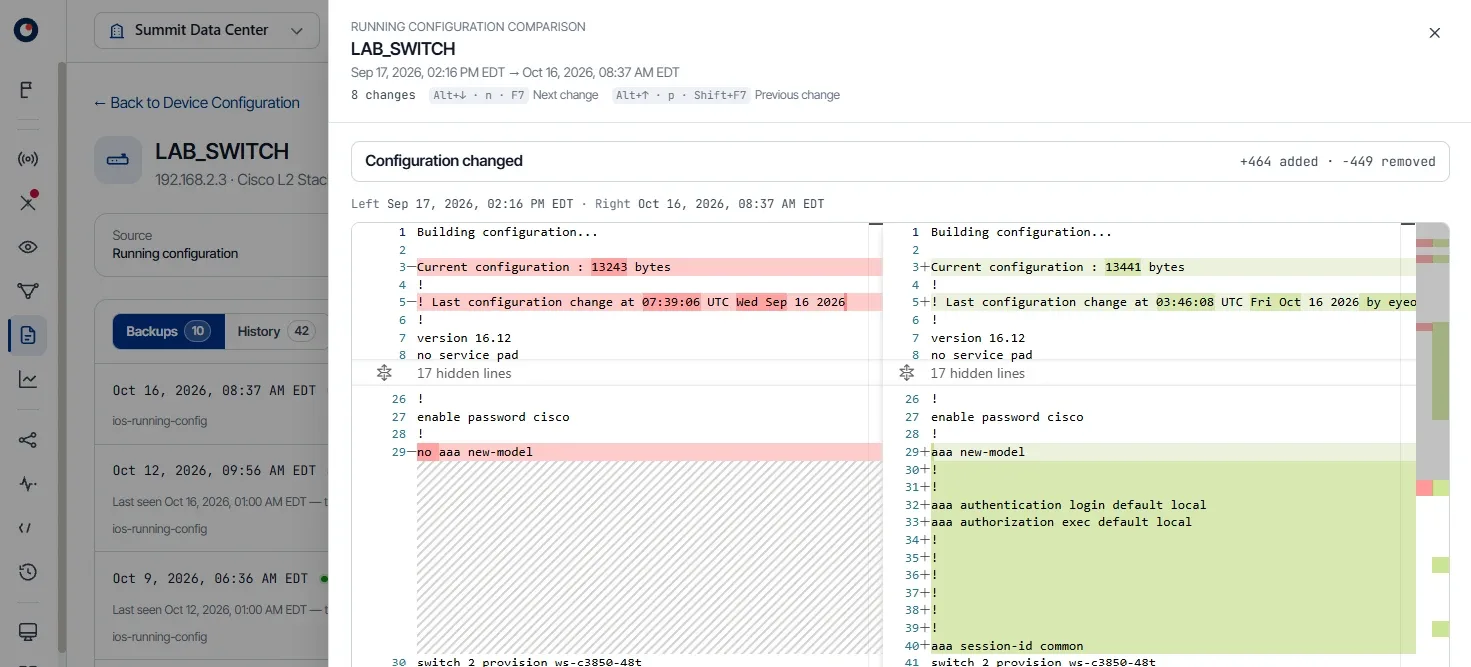
Drive, RAID and SMART health from iDRAC, iLO and Redfish. Pending OS updates and operating systems approaching end of life. CPU, memory, disk capacity and uptime trends that show what’s degrading and support capacity planning. Configuration backups on supported switches, routers and firewalls, so a replacement unit can be restored from the last known-good config.
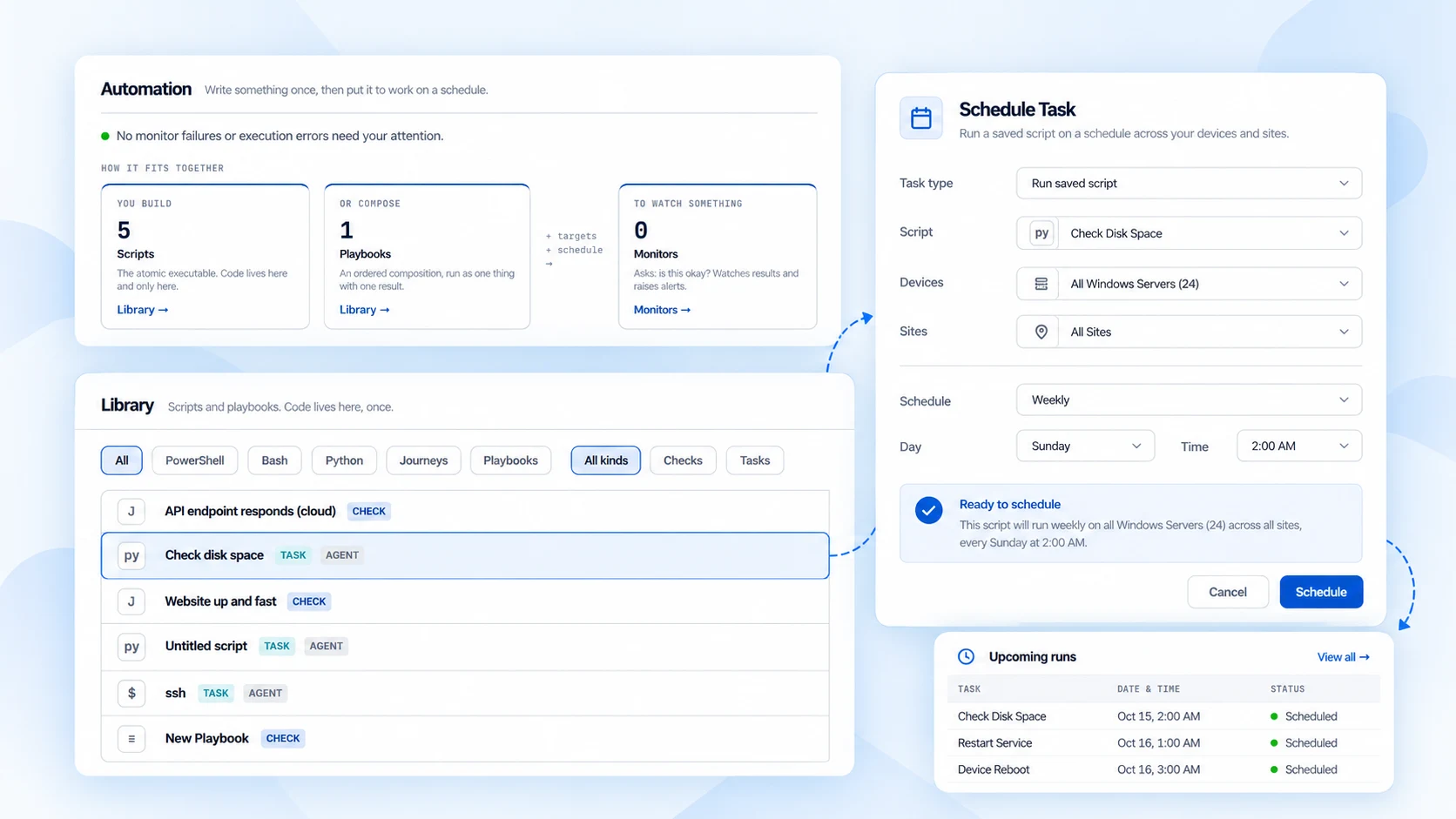
Run reboots and saved scripts on a schedule across devices and sites, so routine maintenance doesn’t depend on a technician working one device at a time.
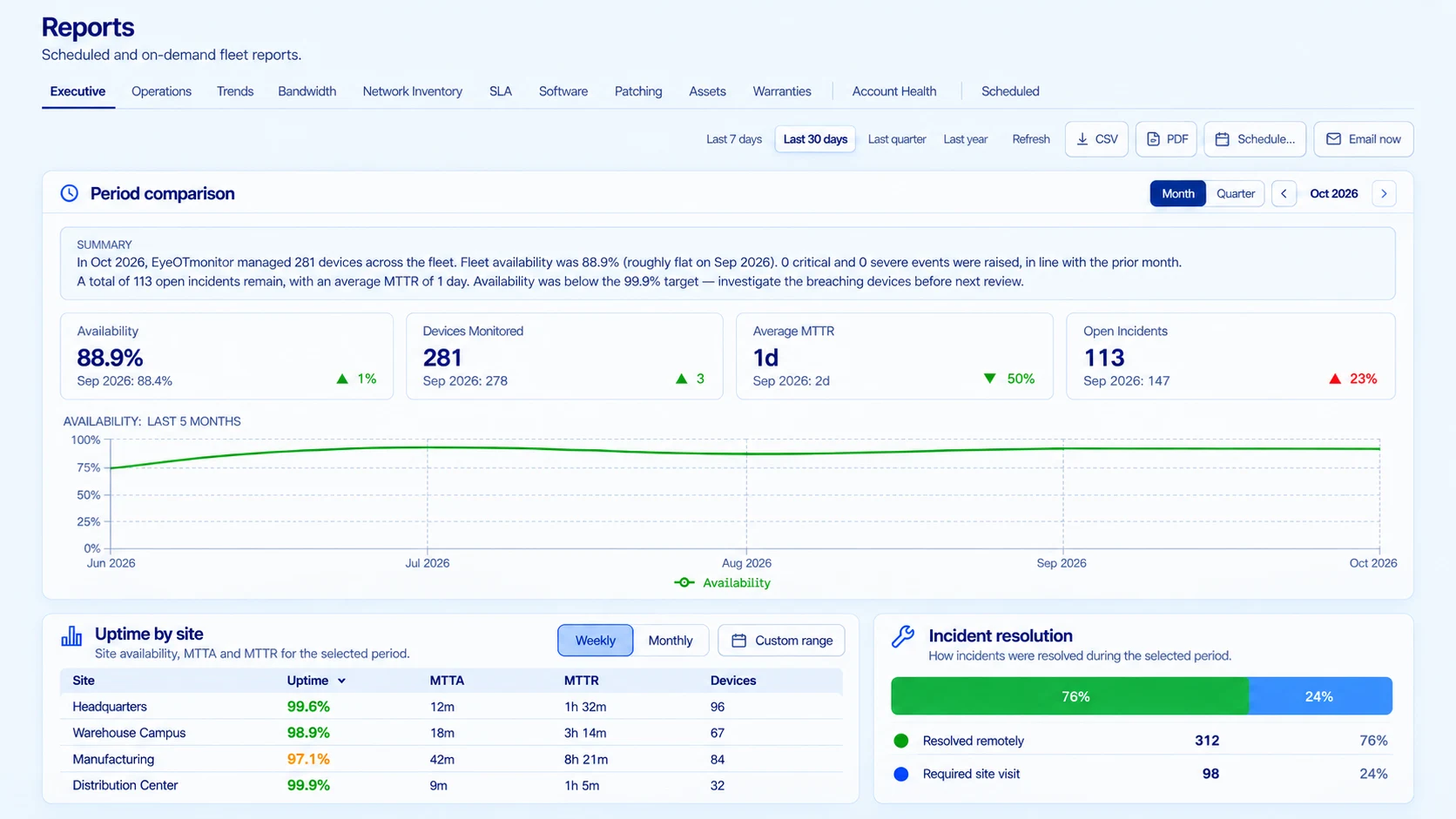
Uptime, MTTA and MTTR by site, plus which incidents were fixed remotely and which needed a site visit. Use the numbers in SLA reviews, headcount requests and hardware refresh planning.
We’ll take one site from discovery to day-to-day operations, live.
IT & OT infrastructure
RMM covers endpoints, NMS covers the network, APM covers applications, and physical security platforms cover their own devices. PSA and ITSM tools track tickets, not infrastructure. eyeOT monitors every layer and groups related alerts into one incident.
| Infrastructure | RMM | NMS | APM | Physical security | PSA / ITSM | IoT tools |  |
|---|---|---|---|---|---|---|---|
| Servers & hardwareOS, services and hardware health | Covered | Partial | Partial | Not covered | Not covered | Partial | OS, services and hardware health. Remote access with RDP or SSH (no VPN required) |
| Applications & servicesWebsites, logins, databases and APIs | Partial | Not covered | Covered | Not covered | Not covered | Partial | Services, websites, logins, databases and APIs |
| Network infrastructureSwitches, firewalls, ports and Layer 2 topology | Partial | Covered | Not covered | Partial | Not covered | Partial | Switches, firewalls, ports and Layer 2 topology |
| Cameras & VMSDevice, stream, recording and image health | Not covered | Partial | Not covered | Covered | Not covered | Partial | Device, stream, recording and image health |
| Access controlPanel availability and remote actions | Not covered | Partial | Not covered | Covered | Not covered | Partial | Panel availability, switch port and remote power-cycle |
| Fixed wirelessRSSI, SNR and modulation on PtP/PtMP links | Not covered | Partial | Not covered | Not covered | Not covered | Partial | RSSI, SNR and modulation on PtP/PtMP links |
| OT & IoT devicesAvailability, PoE and remote power-cycle | Not covered | Partial | Not covered | Partial | Not covered | Partial | Availability, switch port, PoE and remote power-cycle |
| Remote managementService restarts, device reboots and ports | Covered | Partial | Not covered | Partial | Not covered | Covered | Service restarts, device reboots, power-cycle devices and ports |
Typical coverage by tool category. Individual products vary.
See your compute, network and OT layers together, on one of your sites.
Example: One incident, start to finish
See how this would play out on your sites.
Get a Custom DemoCustomer proof
Fox Den Productions uses eyeOT alerts to catch problems on the servers behind its customers’ systems.
Because of the way the alerts are set up, eyeOT emailed us that a server had rebooted five times. There was a program running on it that kept locking up the whole PC. By using eyeOT, we were able to figure out and eliminate that service.
Who it’s for
Keep watching customer infrastructure after handoff. See which switch, server or recorder is behind a problem before you roll a truck.
For integrators →See the network, servers and building systems you’re responsible for in one place, with what each device depends on.
For IT & OT teams →FAQ
For infrastructure monitoring, it can. eyeOT covers the servers, applications, network and OT devices that are usually split across an RMM, an NMS and vendor tools, and some teams use it in place of their NMS. Keep your RMM for endpoint management and patch deployment: eyeOT reports pending OS updates but doesn’t install them.
Servers: Windows, Linux and macOS, plus hardware health through Dell iDRAC, HPE iLO and Redfish. Virtualization: VMware vSphere and ESXi. Applications: services, processes and custom checks. Network: switches, firewalls and wireless links. Devices: any IP device at network level, including cameras, door controllers and OT equipment, with deeper integrations for supported VMS platforms, cameras and Life Safety Power supplies.
Yes. eyeOT reads drive, RAID and hardware health through iLO, iDRAC, BMC and Redfish, so a failed drive or degraded array raises an alert before a second failure takes the array down.
VMware vSphere and ESXi, including VM health and remote power-cycling, plus agentless VM visibility for Microsoft Hyper-V. Proxmox and Nutanix aren’t supported yet.
Yes. eyeOT monitors Windows services and processes and runs custom checks for website availability and response time, login flows, databases and APIs. Failed checks open an incident on the host server. eyeOT doesn’t do code-level tracing, so keep your APM if you rely on it for that.
At network level, yes: eyeOT alerts when a device stops responding to ICMP or SNMP, shows the switch port and power it depends on, and can power-cycle PoE devices on supported switches. Protocol integrations such as BACnet and Modbus aren’t available yet.
Yes. eyeOT has a two-way ConnectWise PSA integration: an incident and its ticket stay in sync and close together, so one problem stays one ticket. Alerts can also go to email, webhooks, Slack, Microsoft Teams and PagerDuty.
The agent connects outbound over HTTPS only, so it needs no inbound firewall rules and no VPN. It runs on Windows, Linux, macOS, Docker or a Raspberry Pi, installs in about a minute and covers 500 to 1,000 devices.
No. eyeOT shows which servers have OS updates waiting but doesn’t install patches. Remote actions are taken by an authorized technician. Routine tasks such as reboots and saved scripts can run on a schedule, but alert-triggered automation isn’t available yet.
Yes. For segmented networks, such as camera or OT VLANs, place an agent inside the segment; it needs only outbound HTTPS. For fully air-gapped sites with no internet access, deploy the eyeOT platform on-premises. Ask us which features are available in on-premises deployments.
See it in your environment
Bring one site. We’ll show you what eyeOT discovers on it, how it’s connected, what needs attention and what your current monitoring misses.
Get a Custom Demo