
For IT & OT Teams

Monitor and fix the OT on your IT network.

Cameras, door controllers and PLCs run on your network, but each team sees only part of them. eyeOT maps what each device depends on, catches the recording, image and server failures ping misses, and puts IT, OT and security on one incident. Admin-only remote fixes need no inbound firewall rules.

City street corner with a pole-mounted security camera, an open roadside cabinet of network switches and PoE gear, a laptop showing live camera views and an access reader on the gate, with cameras, network, VMS and controllers labeled
Cloud or on-premHosted by eyeOT or in your data center
SOC 2 Type IIIndependently audited controls
2026 SIA New Products and Solutions Awards winner
2026 SIA NPS Award WinnerRecognized at ISC West
Multi-site & partner accountsIntegrators on the same live map

How it works

Cut MTTD, MTTR and truck rolls across IT and OT.

eyeOT covers discovery through Day‑2 operations for cameras, VMS servers, door controllers, PLCs and the network underneath. IT, OT and security work from the same map without jumping between the VMS, the NMS and a spreadsheet.

01 · Know what’s on the network

See what’s actually plugged in.

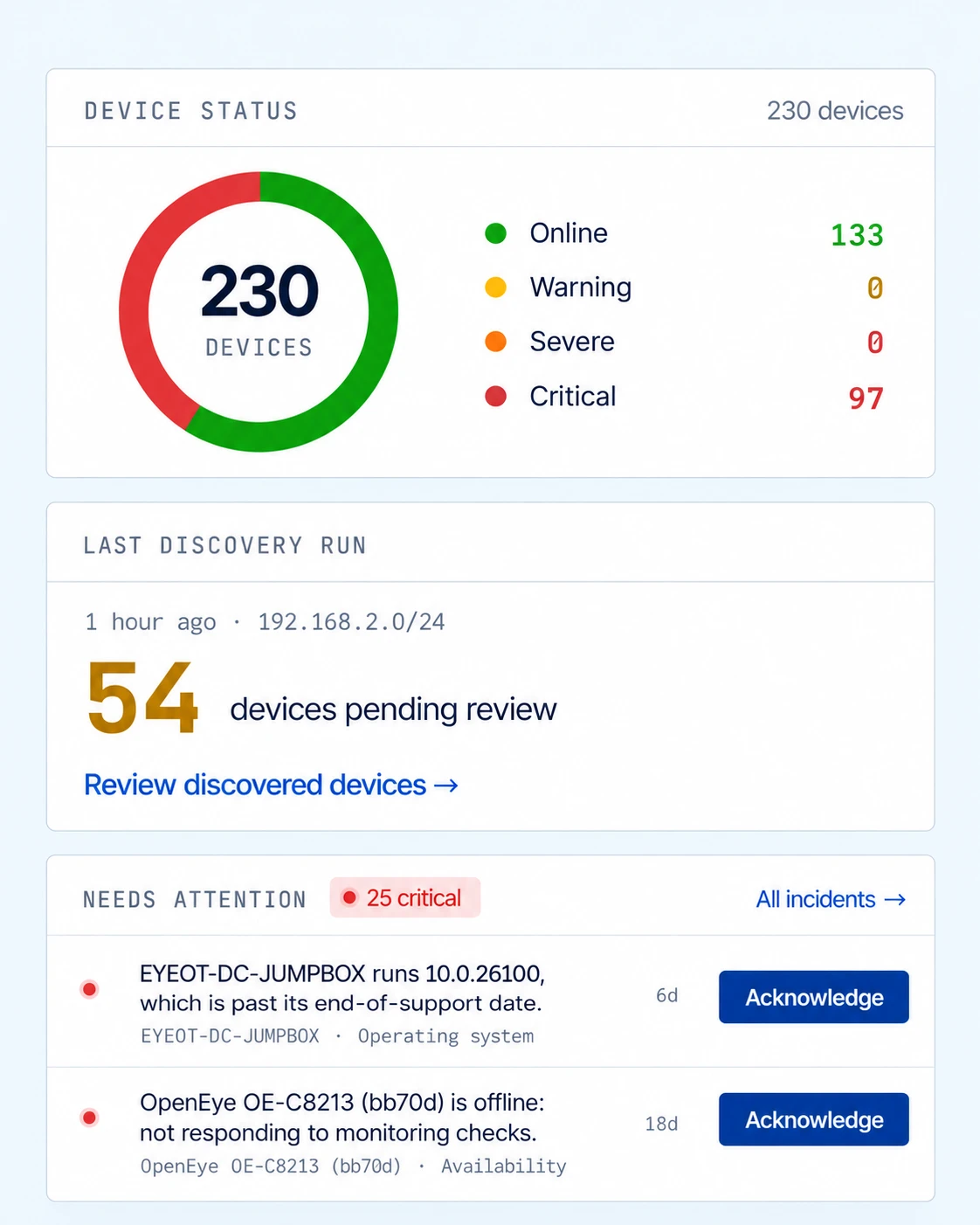
“Which switch is that camera on?” Today the answer lives in a Visio of what someone thought was installed, a VMS device list and a login to every switch. eyeOT builds the inventory from SNMP, CDP/LLDP, CAM tables, your VMS and scans of the subnets you choose: make, model, IP, MAC and managed-switch port.

ResultsOne current inventory, with new and unknown devices flagged for review.
See supported devices →

eyeOT device status: 230 devices with 133 online and 97 critical, a discovery run on 192.168.2.0/24 with 54 devices pending review, and incidents needing attention

02 · Beyond up/down checks

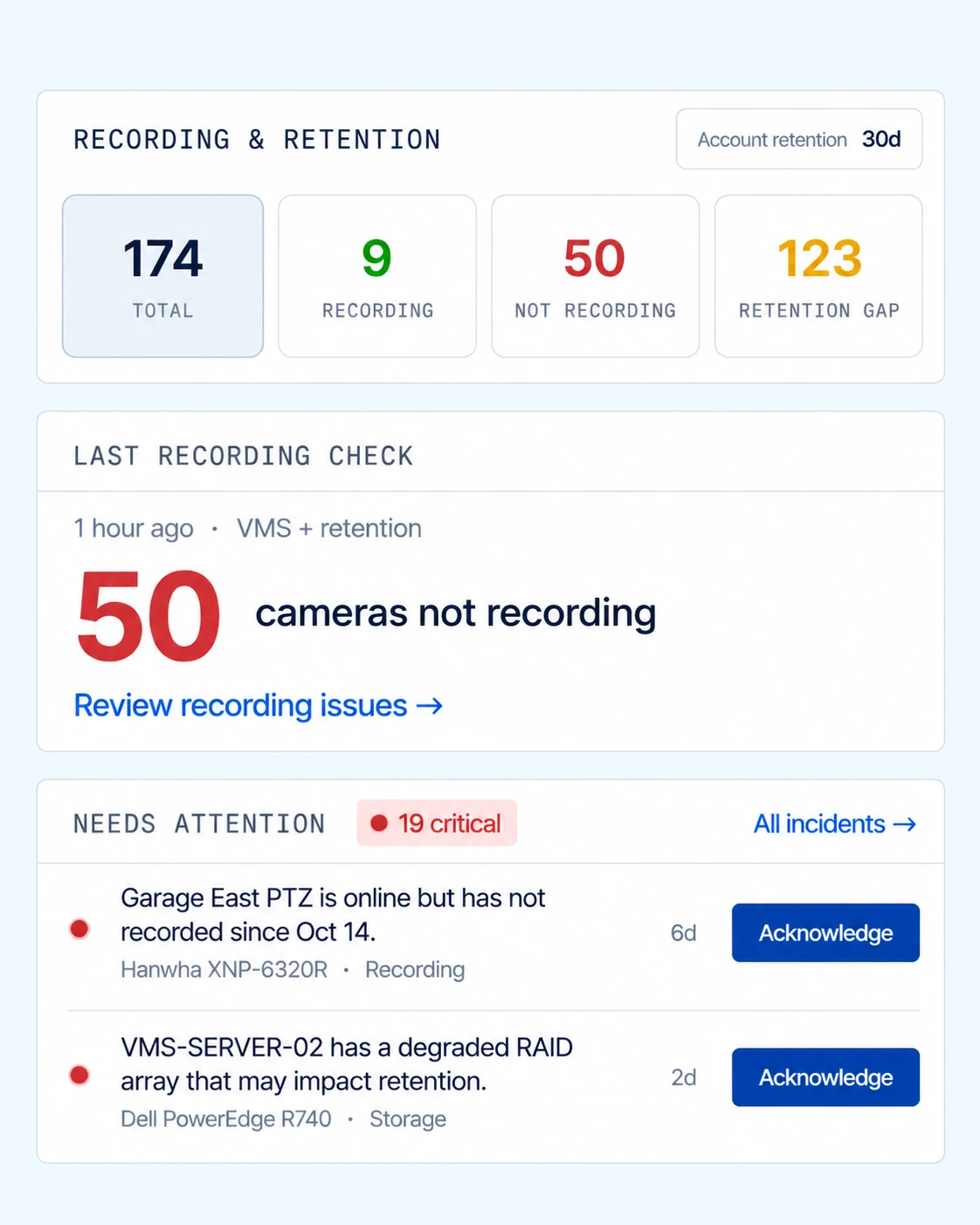
Catch cameras that stop recording.

“Legal needs footage from the 14th.” The camera answered ping all month, so nobody knew it had stopped recording. eyeOT checks recording and retention per camera, ImageAssure checks snapshots for blurred, blocked or shifted views, and server checks catch a degraded RAID array or a stopped VMS service.

Results10–20% of cameras fail their first eyeOT check. Find yours before Legal asks.

How ImageAssure works →

eyeOT recording and retention: 174 cameras with 9 recording, 50 not recording and 123 with a retention gap, plus incidents for a PTZ camera not recording and a VMS server with a degraded RAID array

03 · Point-of-failure incidents

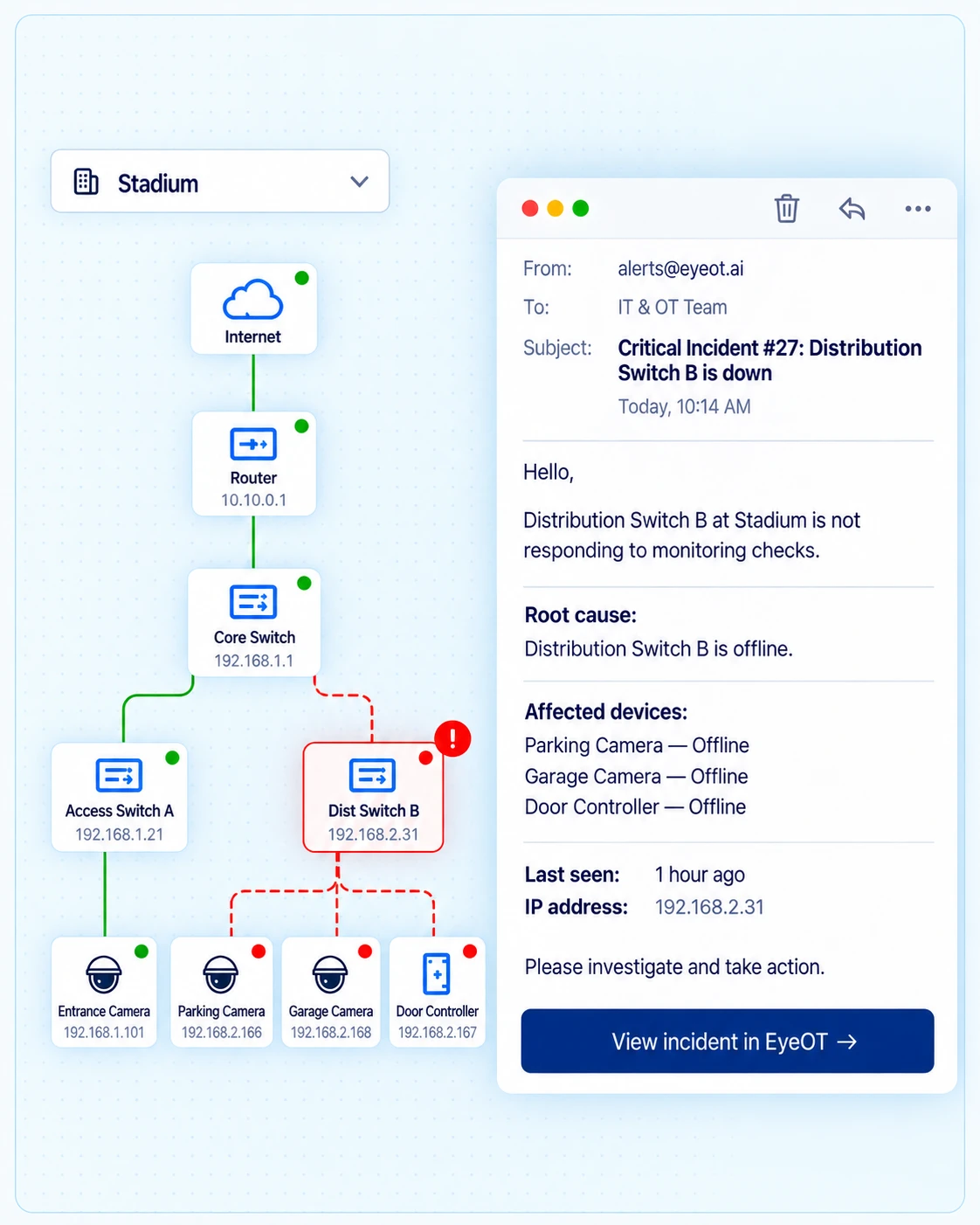
Find the failed switch or uplink.

“Cameras in the garage are down. Is it the network?” When a switch or uplink fails, eyeOT rolls the alerts into one incident at the point of failure and lists the cameras, controllers and PLCs behind it. IT, OT and security work the same incident instead of each team proving it isn’t their gear.

ResultsOne incident with the dependency chain attached, sent to Teams, Slack or PagerDuty and ticketed in ServiceNow or ConnectWise PSA.
eyeOT stadium topology with Distribution Switch B offline and its two cameras and door controller affected, beside a critical incident email naming the root cause

04 · Remote actions

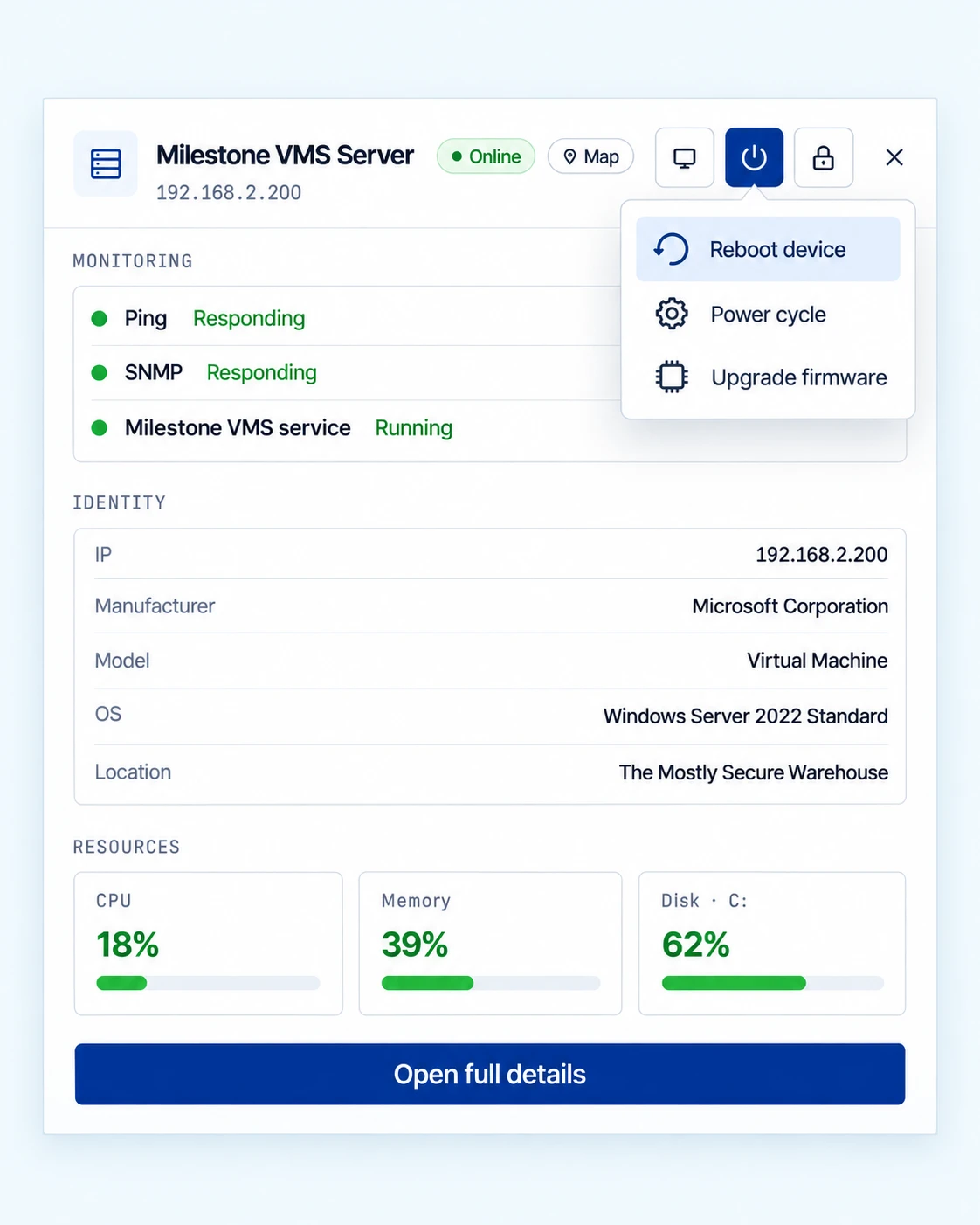
Fix reboot-level faults remotely.

“Can someone drive out and power-cycle it?” Not for a reset. Admins reboot Axis and Hanwha cameras, Cisco switches and servers, bounce a Cisco or MikroTik switch port (cycling PoE on supported switches), restart a Windows service or open SSH and RDP. Nothing runs unless an admin starts or schedules it.

ResultsNo VPN, no jump host and no inbound firewall rule. Dispatch only when the fix is physical.
eyeOT device panel for a Milestone VMS server showing ping, SNMP and service checks, identity details, CPU, memory and disk usage, with a remote action menu to reboot, power cycle or upgrade firmware

05 · Reporting & capital planning

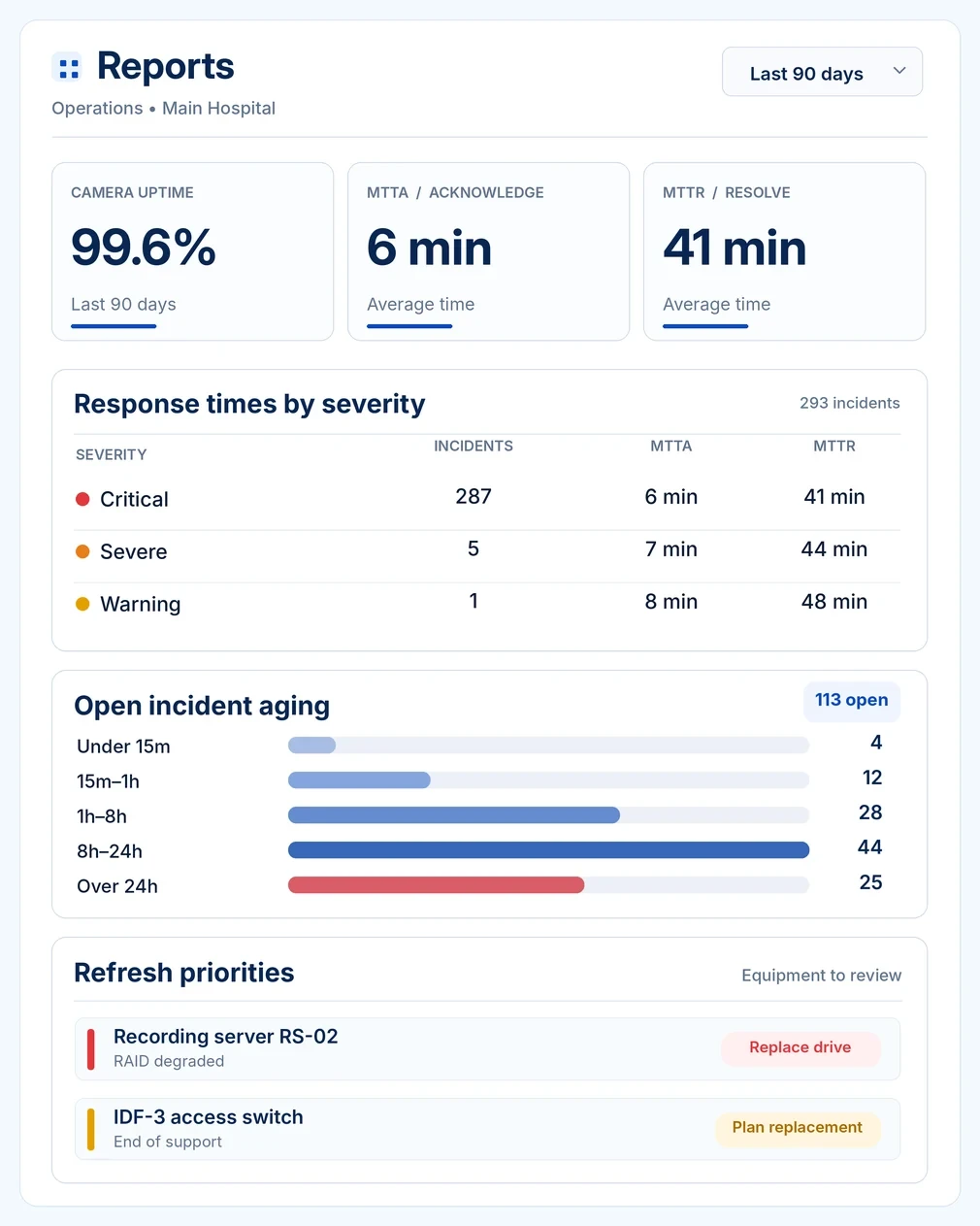
Prove uptime and plan the refresh.

“What was our camera uptime last quarter, and what do we replace next year?” eyeOT reports uptime, MTTA/MTTR against your SLA and health scores by site, plus drive and RAID health, firmware versions on supported devices and the systems that keep failing.

ResultsEvidence for the budget meeting, the SLA review and the vendor conversation.
eyeOT operations report for a hospital over the last 90 days: 99.6% camera uptime, 6 minute MTTA and 41 minute MTTR, response times by severity across 293 incidents, aging for 113 open incidents, and refresh priorities for a recording server and an access switch

See eyeOT on a network built like yours.

Bring your device mix: cameras, VMS, controllers, PLCs and switch vendors. We’ll walk through discovery, a point-of-failure incident and a remote fix next to the NMS, VMS and ITSM you already run.

Get a Custom Demo

The operational impact

Measured in the KPIs you already report.

IT/OT convergence put these devices on your network. In a county, a hospital or a utility, their downtime is a safety and liability issue. Here is what changes when they’re in your operations, too.

Lower MTTD

Find failures before anyone else does.

Catch what staff, the public or auditors would notice first, including what your NMS still reports as up.

Lower MTTR

Start at the cause, not the alarms.

Open the failed switch or uplink with every camera, controller and PLC behind it already listed.

Fewer truck rolls

Reset it remotely. Drive out only for physical fixes.

Port bounces, reboots, service restarts and SSH or RDP sessions run through the site agent.

Fewer consoles

One place to check, not four.

Recording status, switch port, server health and OT availability in eyeOT instead of separate logins.

Reportable uptime

Uptime you can show leadership.

Scheduled MTTA, MTTR, availability and health score reports by site for leadership, auditors and vendors.

Refresh planning

Back every replacement with evidence.

Hardware health, firmware and incident history by site behind each capital request.

Customer story

Real project. Real results.

Donor Network of Arizona watches its servers, network and cameras in eyeOT, and chooses which alerts go to its outside NOC.

“
eyeOT watches our servers, network and cameras in one place, and we decide which alerts go to our outside NOC. When the NOC calls, we’re both looking at the same incident and can get straight to the fix.
Dave PillingPrincipal Innovation and Technology Strategist, Donor Network of Arizona

IT & OT Team FAQs

What IT and OT teams ask before a demo.

What does eyeOT do for IT and OT teams?

eyeOT is an infrastructure management platform for the cameras, VMS and recording servers, door controllers and intercoms on your network, and the switches, servers and links they depend on. It discovers and maps them, checks that cameras are recording, flags unusable images with ImageAssure, groups the alerts behind a failed switch or uplink into one incident, and lets admins bounce ports, reboot supported devices and restart services remotely. It also monitors PLCs and building controllers at network level.

Does eyeOT replace our NMS, RMM or VMS?

No. eyeOT runs alongside them. Keep your RMM for endpoints and patching, your VMS for video, your NMS for the network and your BMS or SCADA for control. eyeOT connects what each one sees only part of: the camera in the VMS, the switch port it’s on, whether it’s recording a usable image, and the remote fix when something fails. Teams without an NMS use eyeOT’s network monitoring for their switches, routers and wireless links: availability, interface errors and discards, and the topology.

Is eyeOT an OT security product?

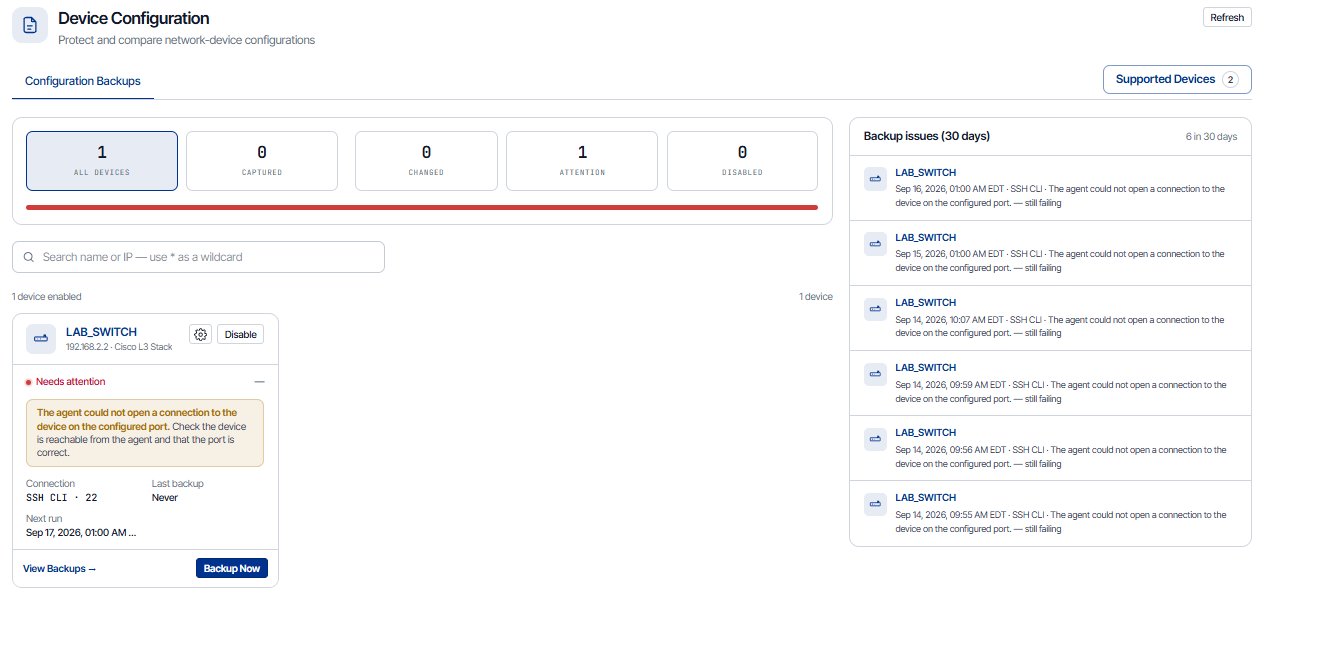
No. eyeOT monitors availability and health and gives your engineers remote fixes. It doesn’t inspect industrial protocols or detect threats, so it runs alongside your OT security tools. What it adds to your security program is a current asset inventory, with new and unknown devices flagged for review, and config changes against a baseline on supported switches and routers.

What does the agent need on our network?

Outbound HTTPS on port 443, nothing inbound. There’s no VPN or jump host to maintain, and we provide the destination list for your egress rules. The agent runs on Windows, Linux, macOS or Docker, covers 500 to 1,000 devices and reaches non-routed camera VLANs from a host with a second NIC in that VLAN, such as the recording server. Run one agent per segment, such as OT, security and infrastructure, and all of them report to one map. A backup agent keeps monitoring running if the primary drops. One customer environment runs more than 20,000 devices.

How does eyeOT behave on a control network?

It goes only where you point it. Discovery scans just the subnets or IP ranges you add, so you can leave a control or SCADA network out of discovery and add PLCs and controllers one at a time by IP. eyeOT checks them over ICMP or SNMP and doesn’t read or write control points. Its only built-in action on a controller is a port bounce or PoE power-cycle on a supported switch, and an admin has to start it.

Can eyeOT run on-premises or in an air-gapped network?

Yes. For networks with no internet egress, deploy the eyeOT platform on-premises. ImageAssure checks snapshots rather than streaming video, and in an on-premises deployment it runs locally, isolated from any cloud. For segmented networks that allow outbound HTTPS, an agent inside the segment is enough. Ask us which features are available on-premises.

Which OT and building systems can eyeOT monitor?

Any IP device at network level: availability over ICMP or SNMP, IP and MAC address and its port on a managed switch. That covers PLCs, BMS and HVAC controllers, intercoms and door controllers. PoE-powered devices can also be power-cycled from supported switches. Deep integrations cover VMS, cameras, switches, wireless radios, servers, VMware vSphere and Life Safety Power supplies. eyeOT doesn’t read or write BACnet or Modbus points today.

Does eyeOT integrate with our access control system?

Not at the software level. eyeOT sees door controllers and panels on your network: whether they’re online and which switch port they’re on. A PoE-powered controller can be power-cycled from its switch port on supported switches. eyeOT doesn’t read door, reader or lock status.

What can our engineers do remotely, and who can do it?

Bounce switch ports on Cisco and MikroTik, reboot Axis and Hanwha cameras, Cisco switches and servers, start and stop Windows services, power-cycle vSphere VMs, and open SSH or RDP sessions in the browser through the agent. Only account admins can run actions or open sessions. Nothing runs automatically except the reboots and scripts you schedule.

Will eyeOT add to our alert noise?

It should cut it. When a switch or link fails, the alerts behind it become one incident at the point of failure, and repeat alerts roll into the open incident with an occurrence count. You set the rules: duration thresholds so a brief drop doesn’t page anyone, a minimum severity for each channel, per-device mutes, and maintenance mode for planned work.

How does eyeOT fit our ITSM and on-call process?

Incidents can open tickets in ServiceNow or ConnectWise PSA, and with ConnectWise, eyeOT updates the ticket’s status when the incident resolves. Alerts go to Microsoft Teams, Slack, PagerDuty, email or webhook; your PagerDuty schedules decide who gets paged. Other ticketing and work-order systems can take incidents by email or webhook, and maintenance mode suppresses alerts during a change window.

Can our integrators and contractors work in eyeOT?

Yes. Give each integration partner its own account, as Queen Anne’s County does. Viewer access shows status without letting anyone change settings or run actions, and remote sessions stay limited to admins.

What can we report to leadership and auditors?

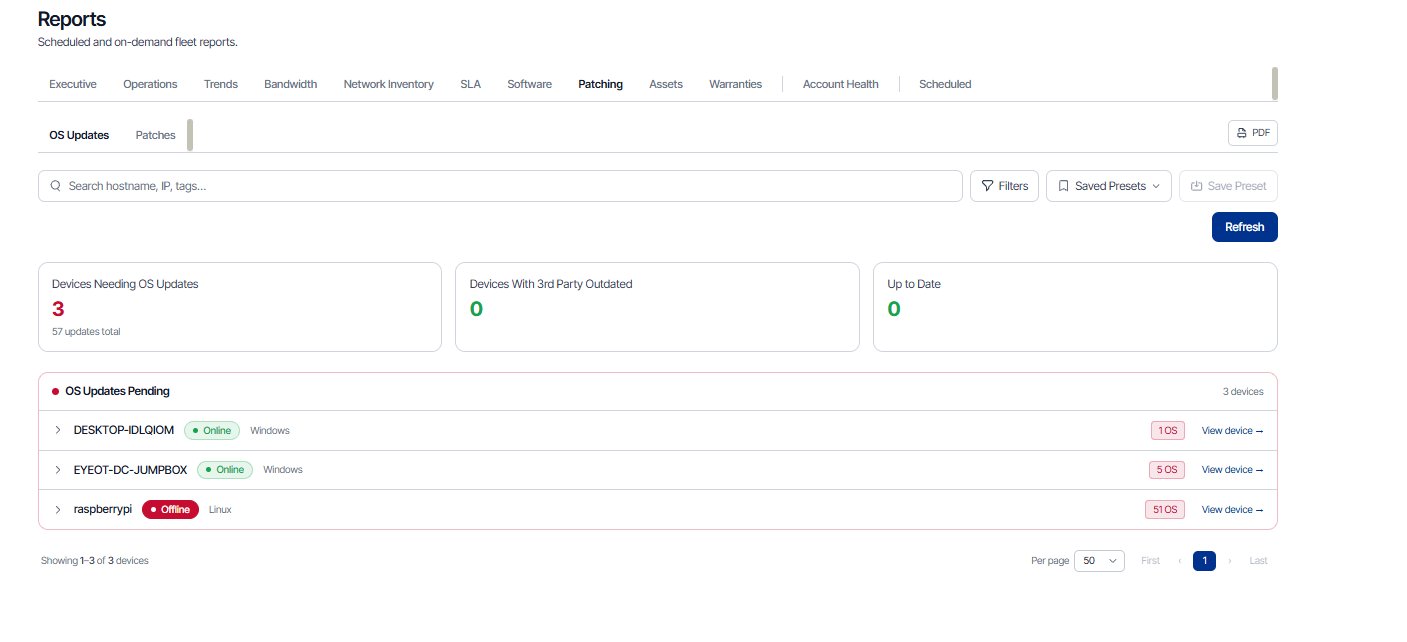
MTTA and MTTR against your SLA, an operational review with incidents by hour and type and the top failing systems, health scores by site, availability history and scheduled CSV reports. Firmware versions, drive and RAID health and incident history feed the refresh plan, and config snapshots on supported switches and routers show what changed against your baseline.

What do we have on hand to recover after an outage?

A current inventory with each device’s switch port, configuration snapshots of supported switches and routers, so the last known-good config is on file for the replacement, and the incident and availability history that shows what failed and when. eyeOT doesn’t push configs back to devices; your engineer configures the replacement from the saved copy.

How is eyeOT priced?

eyeOT is priced per monitored device: a switch, a camera or a server counts once, with no separate charge per port or sensor. The total depends on how many devices you monitor and which add-ons you use, such as ImageAssure. Share a rough device count and we’ll send a quote.

Bring us the environment you’re actually running.

Send a rough device count, your VMS and switch vendors and the networks that are off-limits. We’ll scope the demo to your environment and walk your security and OT teams through the outbound-only, agent-per-segment design.

Get a Custom Demo
Get a Custom Demo